Editing the Website Configuration file
To set up the display of your static website, you have to edit the website configuration file.
To edit the configuration file:
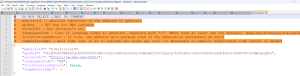
1. Open the Config.json file in edition mode.
 The default path is: C:\ProgramData\MEGA\Hopex Application Server\<name of the HAS instance>\.shadowFiles\Macros\website.static.macros\<version number>\daily_batch\Exe\config.json
 Make sure you use the "Config.json" file which is inside the "Exe" folder.
 2. Enter/edit the following information if needed:
• "websiteID": enter the Absolute Identifier of the website to generate.
• "apiKey": enter the API key.
See API Key.• "serverUrl": enter the HAS instance's URL.
• (Optional) "languagesCode": the website is generated in English by default. Edit or add code language(s), separated by ";" to generate the website in the language(s) of your choice.
For example, the following code languages can be entered: FR (French); ES (Spanish); DE (German); IT (Italian); PT (Portuguese). If you set up other languages here, further configuration is required before launching website generation. See Language-Specific Configuration.• (Optional) "forceContinuOnError": the "false" value is set by default. Enter "true" to package the website even if the generation encountered an error.
• (Optional) "temRefreshApi": "300s" is set by default. Reduce the wait time to refresh the API call if needed.
3. Save and close the file.