Managing your data with HOPEX Digital Transformation Desktop
Accessing to data models with HOPEX Digital Transformation Desktop
To access the elements that are part of your data:
1. Click the Data navigation pane.
2. In the navigation pane, click Hierarchy.
The tree of elements that allows you to classify your data is displayed.
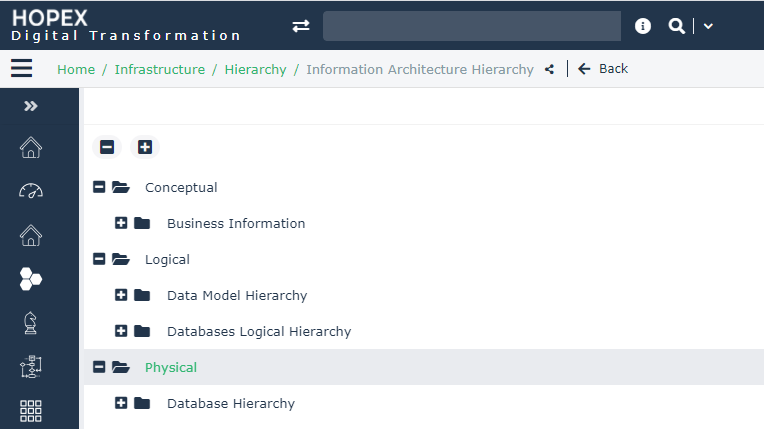
• The conceptual level enables the definition of the business function architecture concepts available with HOPEX Information Architecture;
• Logical level for clients seeking to develop general business-oriented models with;
 See HOPEX Information Architecture - Logical Layer.
• Physical level for defining models intended to persist in a DBMS. It comprises detailed specifications for production of the physical diagram of the repository carried out with HOPEX Information Architecture.
See HOPEX Information Architecture - Physical Layer.Accessing to the HOPEX Information Architecture solution
To access the lists of objects dedicated to your enterprise data management:
1. Click the Data navigation pane.
2. In the navigation pane, click Inventory.
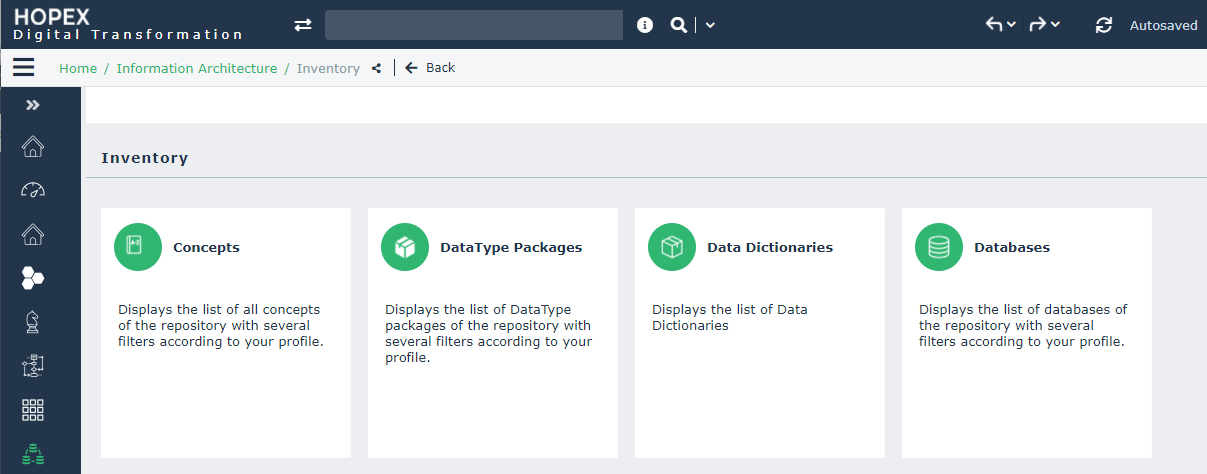
A list of tiles is proposed to help you to manage your data: