TOGAF Books
The use of books simplifies collaborative work by offering possibilities of adding notes in paragraphs, by enabling automatic update of inserted components, and management of access to objects currently being modified. In addition, books use the capacities of HOPEX to manage several languages.
Accessing TOGAF 9 book templates
In order to create instances of deliverables, HOPEX Suite for TOGAF has integrated a documentation structure based on books. These book instances are created from TOGAF 9 book templates.
The TOGAF 9 book templates are only available if the "TOGAF 9 - Data" add-on has been imported.
 Templates must not be modified by the Project Manager! Only instances of books should be modified.
A book is built using chapters and paragraphs. A book can also reference another book or reports.
The structure of a TOGAF 9 book is accessible from the TOGAF 9 navigation window.
To view a book and its component elements:
1. Expand the Book Templates folder.
The following window appears on the left of your workspace.
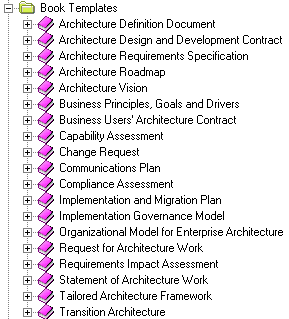
The text content of a chapter is defined in paragraphs. This content can be a text, a diagram, an object or an external reference.
Viewing the content of a book or chapter
Structuring in chapters and paragraphs enables flexible organization of presentation. HOPEX objects of different types can be dragged into the book, content of which is automatically updated.
The content of a book or chapter is visible in its properties dialog box.
To view the content of a chapter:
1. Click the chapter in the navigation tree.
2. Then click the Properties button  in the toolbar of the workspace.
in the toolbar of the workspace.A properties window appears.
To simplify your work, position the properties window in the central part of the edit area by right-clicking the window title bar and selecting Integrate in Edit Window.3. Select the Properties window and select the Documentation Report tab to view the text of the chapter.
To avoid long display times, diagrams are replaced by a standard image. You can display the diagram by clicking its image.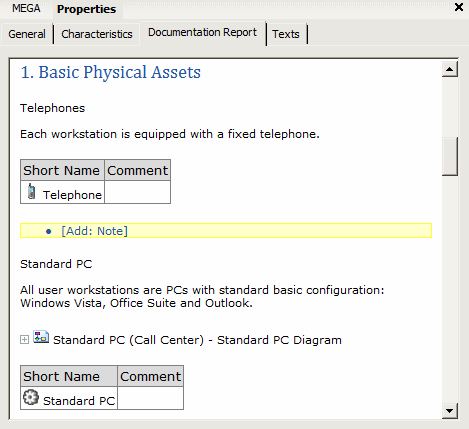 To view all diagrams and reports contained in a paragraph, click the Expand All button on the right
  To view a report inserted in a book, click the Display Report button on the right
 Using books
In HOPEX Suite for TOGAF, book templates are delivered with standard structure. A book, attached to a work package, can be enriched with new elements.
To create a book from a book template:
1. Open the properties dialog box of the work packageand select the Method tab.
2. In the "Deliverables" section of the page, click button  to create an instance of a book template.
to create an instance of a book template.The instance appears in the page and the template is selected.

A new book is automatically classified in the Contents folder of the work package. You can expand the book to see the chapters.
Accessing the content of a paragraph
From the properties window of a book or chapter, it is possible to access objects contained in paragraphs.
To access a diagram or the objects it contains:
1. Click the diagram so that its components are displayed.
2. Right-click any component to open its pop-up menu and access its characteristics.
To access the text of a paragraph from the Documentation Report tab of the properties window of a chapter or book:
1. Click the Edit  button on the right of the paragraph that interests you.
button on the right of the paragraph that interests you.The properties dialog box of the paragraph opens.
2. Select the Characteristics tab to access the text of the paragraph.
3. Modify the existing text.
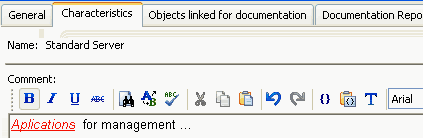 Note that the Comment area proposes features similar to those of MS Word, including a spelling checker.
4. Click OK.
Connecting objects to a paragraph
Several types of objects can be connected to a paragraph:
• Diagrams
• External references
• Objects
You can use the Connect command in the paragraph pop-up menu to connect new objects.
It is also possible to connect an object to a paragraph by selecting the object and dragging it to the target paragraph.The list of elements referenced in a paragraph is available from the navigation tree of the book.
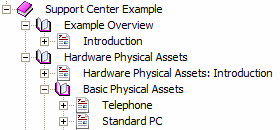
An alternative method of access to all objects referenced in a paragraph:
1. Open the properties dialog box of the paragraph and select the Objects linked for documentation tab.
2. Use the Connect or Reorganize buttons to modify paragraph content.
You can view the result of your modifications by selecting the Documentation Report tab.
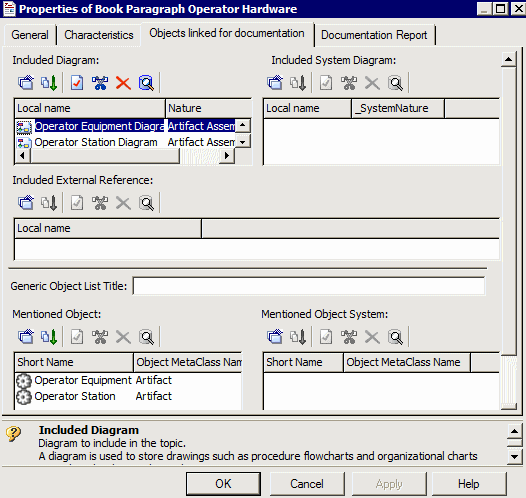
3. Click OK to finish.
The sections Included System Diagram and Mentioned Object System enable referencing of system objects such as descriptions, document templates and queries.