Managing Date and Time Formats
In HOPEX, the date and time formats depend on the data language format.
These formats are defined for each language in the Windows parameters of HOPEX installation server.
If needed, you can change these formats in HOPEX.
 This customization is lost at HOPEX upgrade.This modification uncompile technical data.
To change the date/time format for a language:
1. Connect to HOPEX with the HOPEX Customizer profile.
 Check that you are allowed to modify HOPEX data (Options > Installation > Customization), see Managing HOPEX Data Customization.
2. In the search by object type tool, in the first field, select Languages.
3. Click Find  .
.
.4. Access the Properties of the language concerned.
5. Display the Characteristics - Characteristics page.
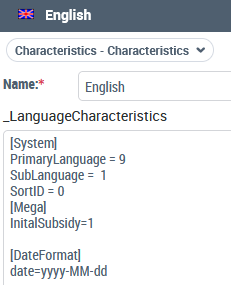
6. In the _LanguageCharacteristics pane, add the date/time format you want to be customized:
[DateFormat]
Date=<date format>
time=<time format>
For dates, you can use separating characters like for example:
"/", ",", "-", or " ".
Examples:
date=yyyy/MM/dd displays 2018/04/24
date=d-MM-yy displays 4-03-18
date=dd MMM yy displays 04 jul 18
For times, you can use separating characters like for example:
"/", ".", or ":".
Examples:
time=HH:mm:ss displays 04:30:20
time=H:m displays 4:30
The modified formats (date and/or time) are automatically taken into account.
This modification uncompile technical data.7. Compile technical data.
Date Format | Description |
|---|---|
d | The day of the month with one or two digits 1...9, 10, 11,..31 |
dd | The day of the month with two digits 01...09, 10, 11,..31. |
M | The numeric format month with one or two digits 1...9, 10, 11, 12 |
MM | The numeric format month with two digits 01...09, 10, 11, 12 |
MMM | The abbreviated name of the month |
Y | The year with one or two digits 9, 22 |
yy | The year with two digits 09, 22 |
yyyy | The year with four digits 2022 |
Time Format | Description |
|---|---|
HH | Time on two digits 00...23 |
H | Time on one or two digits 0...23 |
mm | Minutes on two digits 00...59 |
m | Minutes on one or two digits 0...59 |
ss | Seconds on two digits 00...59 |
s | Seconds on one or two digits 0...59 |