Backing Up Environment Customizations
The following operations allow you to back up modifications made to the standard environment so that these can be imported into a new environment. This backup contains modifications you have made to report templates (MS Word), Web site templates, descriptors, queries etc. It also contains the list of users and their configuration if this exists. You can also save any extensions to the metamodel.
To back up customizations:
1. From HOPEX Administration, connect to the environment.
2. In the Repositories folder, right-click the system repository (SystemDb) and select Logical Backup.
The Repository Logical Backup dialog box opens.
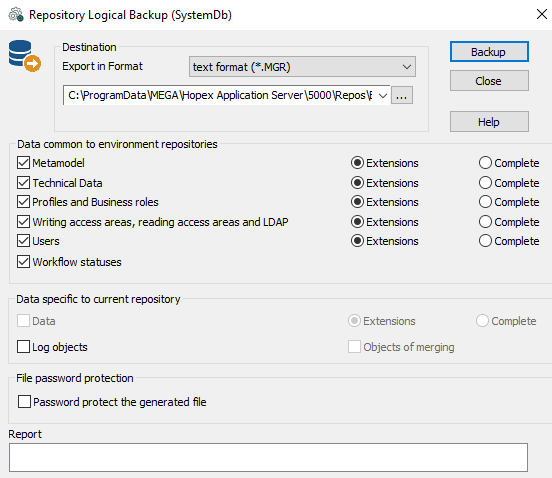
3. In the Destination pane, select the export format of the backup file:
• text (.MGR)
• XML MEGA (.XMG)
 This format cannot be used to extract the metamodel or technical data. This format is reserved for exchange of data between HOPEX and other applications. It includes commands or data (objects and links).
 4. (Optional) In the Destination frame, click Browse  to browse the folder tree and modify the name and/or location of the backup file.
to browse the folder tree and modify the name and/or location of the backup file.By default, the backup is saved in the "SystemDb.mgr" file in the \SysDb\WORK\ folder of the repository.5. Select the type of data you want to save.
The Extensions button corresponds to data created by users. Carry out a complete backup only if technical support asks you to do so.
 It is recommended that you save the extensions of the metamodel and technical data in different files.
In the Data common to environment repositories pane, select the data type of the system repository to be saved:
• Metamodel if you want to extract the metamodel from the system repository. This is useful if the standard metamodel has been modified.
• Technical Data allows extraction from the system repository of data such as descriptors, queries, and report templates (MS Word).
• Profiles and Business roles allows extraction of created profiles and business roles (those not provided by MEGA).
• Writing access areas, reading access areas and LDAP allows extraction of created writing and reading access areas (those not provided by MEGA) and LDAP parameters (parameters, servers, groups).
• Users allows extraction of created users (persons, person groups, logins).
• Workflow statuses enables extraction of workflows (workflow instances, transitions and statuses, tasks, validations, requests for change).
In the Data specific to current repository pane:
• Log objects allows you to also save object logs.
6. (If needed) In the File password protection pane, select Password protect the generated file.
The password is asked at file import.7. Click Backup to start backup.
A series of messages keeps you informed of backup progress.
The file is saved in the selected format (*.mgr or *.xmg) or in *.mgz format if you have selected the file protection option.