Defining a Writing Access Area at Creation
To assign to all objects created by a user a writing access area different from the writing access area of this user, you must associate a writing access area at creation with the user concerned.
To define a writing access area at creation of a user:
1. Open the properties dialog box of the person.
2. Select the Characteristics tab.
3. In the Writing Access Area at Creation field, select the required writing access.
To define a writing access area at creation of a user:
1. From HOPEX Administration, open the writing access diagram.
2. If this is not already done, place the person and the writing access area concerned in the diagram.
3. Draw a link between the person and the required writing access area.
The Create Link dialog box opens.
4. Select Writing Access Area at Creation and click OK.
 Value "None" of Writing Access Area at Creation signifies that the user creates objects in the same writing access area as that to which he/she belongs.
When the writing access area at creation has been created, it is represented by a dotted line link between the person and the writing access area in the writing access diagram.
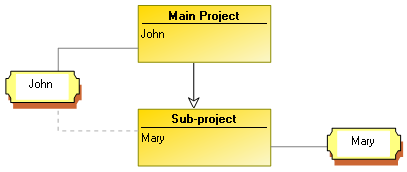
In the above example, user John has:
• a writing access area of level "main project"
• a writing access area at creation of level "sub-project"
Objects created by John can therefore be modified by Mary.