Propagating Reading Access Areas
A reading access area can be propagated to objects connected to a given object. You can propagate reading access areas from:
• HOPEX Administration
• HOPEX.
 The propagation trace is kept when you propagate from HOPEX.
Propagating a reading access area from HOPEX Administration
To propagate a reading access area:
1. Connect to HOPEX Administration and select the repository concerned.
2. Right-click the repository concerned and select Object Management > Object Confidentiality Setting.
3. 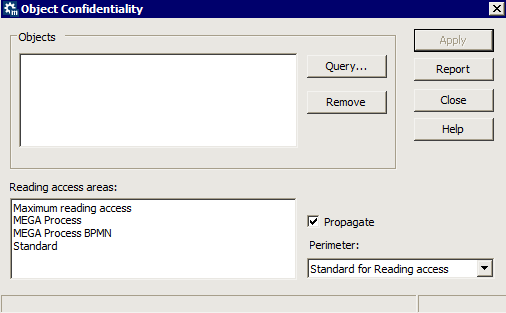 In the Object Confidentiality dialog box that opens, click Query.
In the Object Confidentiality dialog box that opens, click Query.4. Select the desired objects using the query tool, then click OK.
5. In the Object Confidentiality dialog box, in the Reading Access Areas frame , select the reading access area you want to apply to the selected objects.
6. (Optional) Select Propagate to propagate the reading access area to sub-objects.
7. Click Apply.
The operator used to propagate reading access areas is the "Standard for reading access" operator.Propagating a reading access area from HOPEX
To propagate a reading access area:
1. Connect to HOPEX.
2. Open the Administration navigation window.
3. In the Administration navigation window, right-click the reading access area you wish to propagate and select Propagation of reading access area to associated occurrences.
A dialog box may warn you of the presence of propagation conflicts.
Conflicts can arise if child objects are already connected to a different reading access area. You are informed that propagation stops at this child object (the physical link that connects the object to a reading access area is stronger than the reading access attribute value)The operator used at reading access area propagation is the "Standard for reading access" operator.Alternatively, you can use the confidentiality area propagation tool via the menu Tools > Manage > Object Confidentiality Setting.