Confidential or Sensitive Object Behavior
A confidential object is inaccessible to a user that does not have access to the corresponding reading access area.
It is as if the object did not exist, the object:
• does not appear in lists.
• is ignored in query results.
• does not appear in reports, reports (MS Word), Report DataSets or Web sites.
• is not exported, duplicated, deleted or backed up, and its possible "children" (operations of a process, for example) are considered as orphans.
• only appears when another object is created with the same name or when a higher level object with a lower reading access level is deleted.
• cannot be modified.
For more details on reading access areas, see Managing Reading Access in HOPEX.
Displaying a confidential or sensitive object in a diagram
By default, confidential or sensitive objects are visible in diagrams.
 To hide confidential or sensitive objects, see Hiding confidential or sensitive objects in a diagram.
 The name of a confidential or sensitive object is visible in the diagram, but its properties are not accessible. It appears grayed and an icon at bottom right indicates that the object is confidential or sensitive.
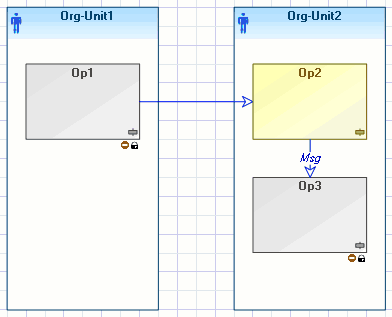 A confidential or sensitive object can only be resized and moved.
To hide MetaClass occurrences in diagrams:
1. Connect to HOPEX.
2. In the HOPEX menu bar, select View > Navigation Windows > MetaStudio.
3. Expand the MetaClass folder and its sub-folders.
4. Right-click the desired MetaClass and select Properties.
5. In the Characteristics tab (Standard subtab) for the Confidential objects display in diagrams property, select Confidential objects are hidden.
6. Click OK.
The occurrences of the corresponding MetaClass are now hidden in diagrams.
You can also configure display of objects in diagrams via the reading access diagram, see Hiding confidential or sensitive objects in a diagram.Export and Duplication
In the case of object export and duplication, if these operations have an impact on confidential objects, a warning message will ask you if you want to continue. If you do execute export or duplication, the confidential objects concerned will be neither copied nor exported.
Invisible objects (confidential) are not duplicated during object duplication. Only a message in the status bar indicates that the duplication result is incomplete.
Generation of reports and Report DataSets
When created, reports and Report DataSets are created with the reading access level of their creator (and not with the reading access level at creation).
Generation of reports (MS Word) and Web sites
When created, reports (MS Word) and Web sites are created with the reading access level of their creator (and not with the reading access level at creation).
They are then always generated at their reading access level.
A Reading access area path attribute exists on all reading access areas. If this attribute is specified, Web sites and reports (MS Word) are generated in this folder. Reports (MS Word) and Web sites are generated in this folder to facilitate reading access management of generated files by defining access rights to this generation folder. This task should be handled by the system administrator.
Confidential report (MS Word) and Web site generation paths can be defined in the properties dialog box of a reading access area.
To define this path:
1. In the reading access area properties dialog box, select the Characteristics tab.
2. In the Reading access area path field, specify the required path.
3. Click OK.
Macros
The principle of reading access management in macros is to carry out all calculations in HOPEX and hide confidential or sensitive objects from users that do not have sufficient reading access area access rights to view them.
By default a macro is executed at user reading access level.
A macro can also be executed at its own reading access level.
If you execute a macro with a reading access level higher than the level of the current user, the methods.
• GetProp(xxx, "display") and GetFormatted return empty,
• GetProp("xxx") returns the value.
ExecuteGlobal and CreateObject ("Mega.Application") methods are prohibited in macros.
Other properties are accessible.
So that a macro can be executed with its reading access level:
1. In the macro properties dialog box, select the Characteristics tab.
2. In _ExecutionOptions, select the Execution at Reading Access level option.
Confidential or sensitive objects and namespaces
If an object with a namespace is not confidential or sensitive, but its parent is confidential or sensitive, the name of the latter will be masked in HOPEX. It appears in HOPEX as:
" ***::Operation 1 "