Managing Objects and Attachments
Managing objects in notifications
The objects you have added on a workflow transition can be added to the notification in the form of a link.
 Object types that can form a link in the notification must be associated with the abstract MetaClass "Notification Related Object".For more details on objects added on a workflow transition, see Transition attachments.
To add objects to the notification in the form of a link:
1. See Accessing workflow definitions.
2. Define a workflow action on a transition or a workflow status and select a macro enabling sending of a notification.
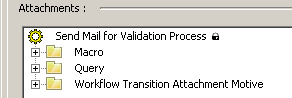
For more details, see Creating a workflow action.3. In the properties dialog box of the workflow action on the transition, select according to your requirements:
• the Attach the Subject check box, to add to the notification a link to the workflow subject
• a macro, in which you must implement the following method:
Void getAttachments (ActionContext, AttachmentObjectCollection)
• a query: relating to the subject, if present
• a motive: all objects corresponding to the motive are added to the notification.
When you execute the workflow, the notification received contains a link to the objects indicated.
Managing attachments in e-mails
In an e-mail, objects you have added on a workflow transition can be the subject of an attachment.
For more details on objects added on a workflow transition, see Transition attachments.To be able to transform the object into an attachment:
1. See Accessing workflow definitions.
2. Define a workflow action on a transition or a workflow status and select a macro enabling sending of an e-mail.
For more details, see Creating a workflow action.3. In the properties dialog box of the workflow action on the transition, connect according to your requirements:
• a macro
• a query
• a motive: all objects corresponding to the motive are added to the e-mail.