Introduction to Perimeters
Perimeters enable configuration of the propagation mechanism which enables building of a set of objects from one or several objects called root objects.
This mechanism is used by certain tools to apply processing to this set.
Examples: Export, Deletion, Duplication.
 See use of perimeters with MetaTools Export or Compare and Align in the HOPEX Administration - Supervisor guide.
MetaTool
A MetaTool is an object that enables definition of perimeters that can be used with a tool.
There is a MetaTool for each tool that uses the propagation mechanism.
To build this set of objects, the MetaTool applies a perimeter to the root object.
You can assign a default perimeter for the MetaTool (see Modifying the MetaTool Default Perimeter).The aim of this perimeter is to provide a standard behavior if no customized perimeter exists in this context.
Propagation
Propagation is the platform mechanism which enables building of a set of objects from one or several objects called root objects.
The propagation principle is to include in the resultant set all the objects connected to an object, then the objects connected to the connected objects, and so on. The resultant set comprises all objects directly or indirectly linked to root objects.
Certain links are taken into account and others not: for a given object, inclusion or non-inclusion in the resultant set of objects linked to the initial object according to link type is called propagation behavior for this link type. Perimeters enable definition of propagation behavior of link types.
Perimeters are associated with MetaTools. MetaTools represent tools that use perimeters to indicate link type propagation behaviors when using a given tool.
Table: Description of propagation behaviors
|
Value
|
Icon
|
Propagation description
|
|---|---|---|
|
Deep
|
 |
Recursive complete propagation:
Takes into account this link and the opposite object only.
Propagation continues. |
|
Standard
|
 |
Simple propagation:
Takes into account this link and the opposite object only.
Propagation stops.
|
|
Link
|
 |
Limited propagation:
Takes into account this link but not the opposite object.
Propagation stops.
|
|
Abort
|
 |
No propagation:
Does not take into into account this link or the opposite object.
No propagation:
|
|
Computed
|
 |
Propagation dependent on context
Link type does not enable determination of perimeter behavior of this object.
Propagation depends on context; it is defined by a macro and can take values "Deep", "Standard", "Link" or "Abort".
See Creating a Perimeter. |
Scope
Propagation behavior is defined by the perimeter.
Each MetaAssociation is linked to a major MetaClass and a minor MetaClass. The perimeter determines the value (Deep, Standard, Link, Abort, Computed) of its MetaAttributes MajorToMinor and MinorToMajor.
The value of MetaAttributes can also be defined by the MetaAssociationType associated with the MetaAssociation.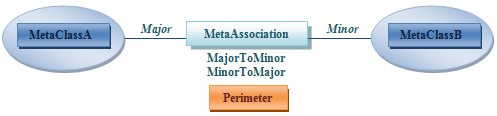
In this example:
• if MetaclassA is taken as root object, propagation behavior to be taken into account is the value of the MetaAttribute MajorToMinor.
Depending on this value, the link and the opposite object MetaClassB are added or not to the set of objects and links.• if MetaclassB is taken as root object, propagation behavior to be taken into account is the value of the MetaAttribute MinorToMajor.
Depending on this value, the link and the opposite object MetaClassA are added or not to the set of objects and links.Propagation example
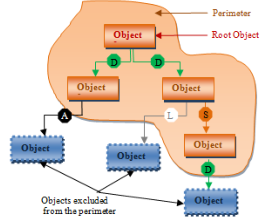
The following example presents object-to-object propagation, from root object "Object 1":
 The perimeter includes object 2 (link Deep with object 1).
Propagation continues and excludes object 4 (link Abort with object 2).
The perimeter includes object 3 (link Deep with object 1).Propagation continues and:
• excludes object 5 (link Link with object 3).
• includes object 6 (link Standard with object 3).
Propagation stops, object 7 is not processed and is excluded despite its Deep link with object 6.
Propagation stops, object 7 is not processed and is excluded despite its Deep link with object 6.