Tips on Using Shapes
Avoiding split shapes
To prevent drawing objects in a shape from drifting apart when you increase their size:
 Align the part that is not proportional to the name with the top left border.
When you increase the height of a shape, the space between the top of the drawing and the non-proportional objects increases with the overall size and the shape may drift apart.
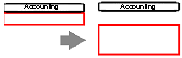
Initial size
It is recommended that you check that the size specified for the shape will allow you to manipulate the shape without systematically distorting it.
Optimal distortion
Use a grid when defining shapes to ensure that any resizing is proportional. To work in finer detail, you can enlarge the shape overall, modify it and then reduce it overall.
Aligning links
Because links are drawn from the center of shapes, their alignment on the grid is simplified when they are of size that is a multiple of double the grid.
Optimizing performance
The display and printing speeds depend on the contents of the shapes:
• Shapes containing bitmaps and metafiles have low printing speeds.
• Thick lines take longer to display and greatly increase the size of the print file.
• Grouped elements slow down display of shapes. They should be reserved for the part that must be proportional to the name.
• Circles and rounded rectangles take longer to display than shapes with angles.