Accessing the Report Templates and their Constituents
Report Templates are accessible in HOPEX (Web Front-End) and HOPEX (Windows Front-End).
Accessing the Report Templates and their constituents in HOPEX (Web Front-End)
To access the Report Templates in HOPEX (Web Front-End):
1. Connect to HOPEX Studio desktop.
2. Click the navigation menu and select Studio > Report Template Definition.
In the Edit area, the Browse view displays the following folders:
• Report Templates, where the Report Templates are classified by their sharing characteristics (Private or Public). You can add sub-folders for a more precise Report Template classification. The HOPEX folder includes standard Report Templates.
• Public Report Data Views, which includes Report Data Views that can be reused. You can add sub-folders for a more precise Report Data View classification.
 A Private Report Data View cannot be reused in another Report Templates, so that it is relevant to its Report Template only.
• Report styles, where Report Styles are classified by their sharing characteristics (Private or Public).
Report styles are used to add styles to Report Templates, see How to Apply a General Style, How to Define the Filters Displayed in a Report and How to apply a Conditional Style to a Graph sections.• MetaTest, where the MetaTests are classified by MetaClass tested.
A MetaTest can be used in Report Style condition properties, see Report Style Condition Properties.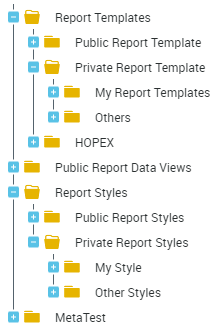
Click a Report Template: its properties are automatically displayed in the Edit area (Multi-View window).
If you click other Report Templates, their properties are automatically displayed in new tabs in the Edit area (Multi-View window).
3. Expand a Report Template  to access:
to access:• its Report Chapters  .
.
.• (for Report Chapters based on macros) its Report Parameters  .
.
.4. Expand a Report Chapter to access:
• (for a Report Chapter based on a macro) its macro  .
.
.• (for a Report Chapters based on Report Data View) the containers  or container group
  including its Report Data Views:
or container group including its Report Data Views:For example:
Report Table View 
Report Matrix View 
Report Graph View 
Report Value View 
Roll the mouse over the Report Data View row and click Properties  : its properties are displayed in the Properties window.
: its properties are displayed in the Properties window.5. Expand each Report Data View to access its constituents:
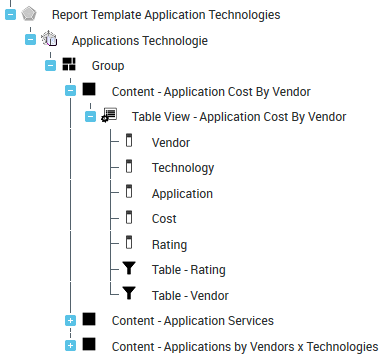
Roll the mouse over the Report Data View element row and click Properties : its properties are displayed in the Properties window.
: its properties are displayed in the Properties window.Accessing the Report Templates in HOPEX (Windows Front-End)
To access the Report Templates in HOPEX (Windows Front-End):
1. Connect to HOPEX with HOPEX Customizer or HOPEX Customizer Publisher profile.
2. In HOPEX menu bar, select View > Navigation Windows > Utilities.
3. In the repository tree, expand Report Templates folder.
All the Report Templates available are accessible.
Right-click a Report Template and select Properties  to access the Report Template properties.
Dedicated tabs enable access to input Parameters and report Chapters.