Using assessment for business capabilities and their implementation
The assessment are based on a business capability map and are accessible using the enterprise stages to which the map is connected. These assessments are therefore valid in the context of a transformation stage and at a given date.
Creating a business capability assessment
The assessment of business capabilities deals with the following characteristics:
• the business value,
• capability effectiveness,
• capability efficiency,
• financial impact.
From a transformation stage, you can create a new assessment with a view to assessing some business capabilities connected to the enterprise business capability map.
To create a business capability assessment:
1. Open the Assessment> Capability Assessment properties page for the transformation stage that interests you.
 The transformation stage is connected to business capability map associated to the enterprise, see Connecting the capability map to an enterprise.
2. Click the New Assessment button.
A selection window presents the tree of the business capabilities of the enterprise business capability map.
3. Select the business capability that you want to assess and click OK.
The selected capabilities appear in the edition area.
4. Click the capabilities to enter the evaluation criteria.
• the business value,
• capability effectiveness,
• capability efficiency,
• financial impact.
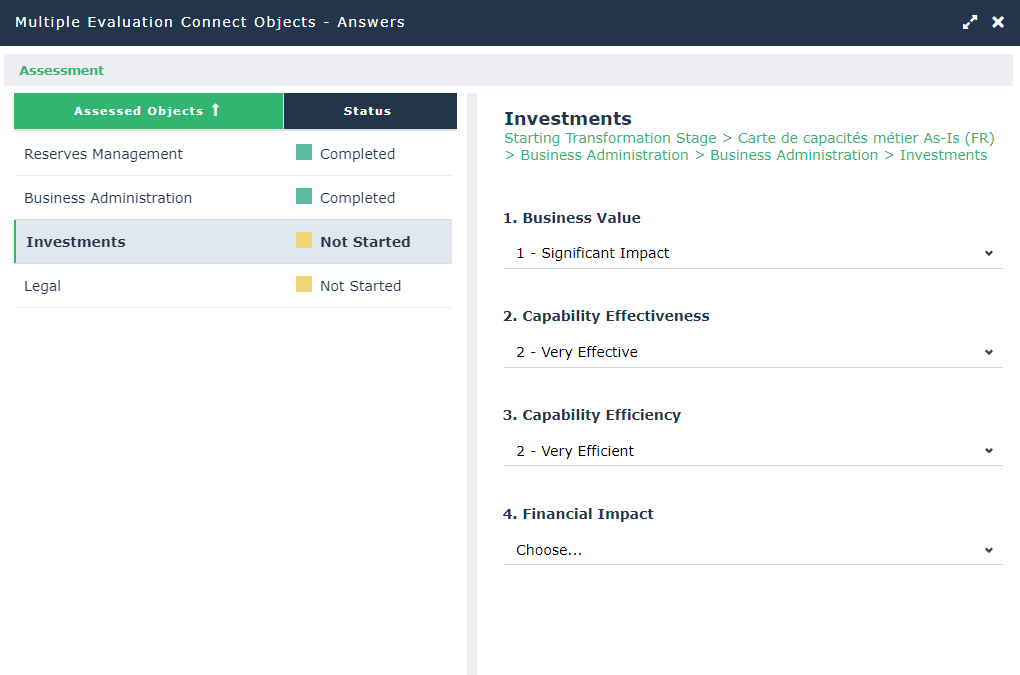
5. Click OK to finish assessment.
The assessment results are displayed in the property page.
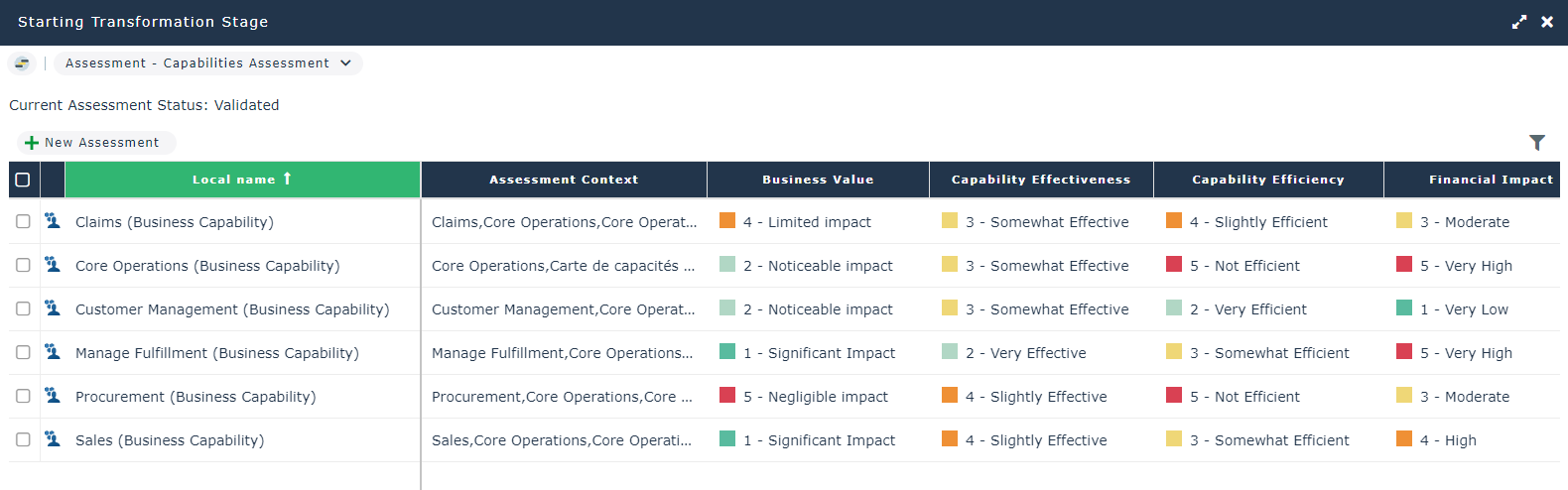
6. Click the Validate Assessment button.
A validation window opens.
7. Define the Evaluation date and click OK.
Creating an assessment of business capability implementation
The assessment of business capabilities realization deals with the quality of the capability realization. The possible values are between very low and very high.
From a transformation stage, you can create a new assessment of business capability realizations.
To create an assessment of business capability implementation:
1. Open the Assessment > Capability Realization Assessment properties page for the transformation stage that interests you.
The transformation stage is connected to the business capability map associated to the enterprise, see Connecting the capability map to an enterprise.2. Click the New Assessment button.
A selection window presents the tree of the business capabilities of the enterprise business capability map as well as those capabilities realizations.
3. Select the business capability realization that you want to assess and click OK.
The selected capability realizations appear in the property page.
4. For each realization, complete the Capability Realization Quality criteria.
5. Repeat the same procedure for Business Capabilities: Validating Assessment by entering the assessment date.