Defining Indicator Categories

To view indicator categories:
 In the navigation menu, select Administration > Indicators > Indicator categories.
In the property page of indicator categories, you can modify the macro used to compute Time To Failure.
 The macro used to compute statuses is defined on key indicator interpretation logics. For more details, see Defining Indicator Interpretation logics.
|
Indicator Category
|
Explanation
|
Visual Explanation
|
|---|---|---|
|
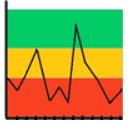
Standard
|
The higher threshold is used to determine the key indicator objective, thus the accepted values. All values higher than the objective are accepted.
|
 |
|
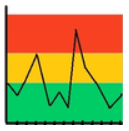
Reverse
|
The lower threshold is used to determine the key indicator objective, thus the accepted values. All values lower than the objective are accepted.
|
 |
|
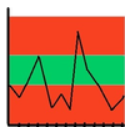
Accepted Values
|
Lower and higher thresholds are used to determine the range of accepted values. Everything outside this range is rejected.
|
 |
|
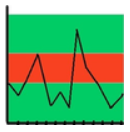
Rejected values
|
Lower and higher thresholds are used to determine the range of rejected values. Everything outside this range is accepted.
|
 |