Initializing a Business Dictionary Using Logical or Physical Data
Initialize a business dictionary consists of creating, in a business dictionary, the concepts that correspond to logical or physical data, and thus creating a realization link between the business concepts and the logical or physical data in question.
A realization report allows you to view these realization links.
There are three ways to initialize a business dictionary:
• from a logical data dictionary (a data package)
• from a physical data dictionary (database)
• from a metadata inventory (data catalog)
• when creating logical or physical data: an automatic initialization option allows you, when you create logical or physical data, to automatically create the corresponding concepts in the working dictionary.
Initializing a Business Dictionary Using Logical Data
To initialize a dictionary using logical data:
1. Click the navigation menu then Tools > Initialize Business Dictionary.
2. Click the Logical Data tile.
A wizard opens.
3. Under Options, specify whether the attributes become Concept Properties or Concept Property Components.
4. Under Source selection, click the Add button and select the source package.
5. Once the package is selected, click Next.
The wizard displays the name of the corresponding business dictionary.
6. Click OK.
The business dictionary is created. It appears in the list of working business dictionaries in the repository.
Mappings between logical data and business objects
|
Logical data
|
Business Objects
|
|---|---|
|
Class
|
Concept
|
|
Part
|
Concept component
|
|
Attribute
|
Concept Property
Concept Property component
|
Initializing a Business Dictionary Using Physical Data
To initialize a dictionary using physical data:
1. Click the navigation menu then Tools > Initialize Business Dictionary.
2. Click the Physical Data tile.
3. In the wizard that appears, under Source selection, select the source database.
4. Once the database is selected, click Next.
The wizard displays the name of the corresponding business dictionary.
5. Click OK.
The business dictionary is created. It appears in the list of working business dictionaries in the repository.
Mappings between physical data and business objects
|
Physical data
|
Business Objects
|
|---|---|
|
Table
|
Concept
|
|
Column
|
Concept Property
|
Initializing a Business Dictionary from Meta Datasets
To initialize a dictionary from meta datasets:
1. Click the navigation menu then Tools > Initialize Business Dictionary.
2. Click the Meta Data tile.
3. In the wizard that appears, under Source selection, select the source deployed data store.
4. Click Next.
The wizard displays the name of the corresponding business dictionary.
5. Click OK.
The business dictionary is created. It appears in the list of working business dictionaries in the repository.
Mappings between meta datasets and business objects
|
Meta datasets
|
Business Objects
|
|---|---|
|
Meta dataset
|
Concept
|
|
Meta data field
|
Concept property
|
Initializing a Business Dictionary when Creating Logical or Physical Data
By default, when you create logical or physical data, the corresponding business concepts are automatically created and associated with that data.
These concepts appear in a working business dictionary that has the same name as the data dictionary that holds the logical or physical data from which the concepts are derived.
This automatic initialization is defined by an option. You can modify the option in order to disable automatic creation of concepts or to create/reuse concepts in other dictionaries.
Modifying the Initialization Option
To modify the initialization option:
1. Click the icon of the user profile and select Settings > Options.
The options window appears.
2. In the left pane of the options window, select HOPEX solutions > Information Architecture > Data Governance.
3. In the right pane, under the Business dictionary initialization field, select the required automatic initialization value:
• Never: disables automatic initialization of the business glossary.
• Work business dictionary: enables automatic initialization of the business dictionary. The concepts are created automatically in the work business dictionary.
• All business dictionaries: enables automatic initialization of the business dictionary. The concepts can be created or reused on all the business dictionaries.
Displaying the Realization Chart
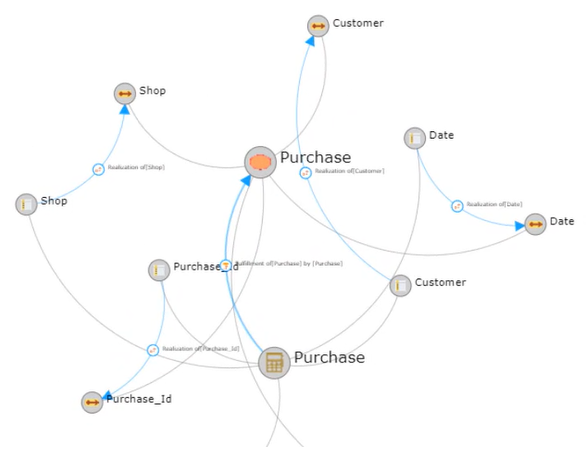
You can use the realization graph to visualize by which architecture elements dictionary elements are implemented.
To access the report:
1. Click the navigation menu then Reports > Description Reports.
2. In the edit area, click Realization Graph.
3. Select the object on which the realization graph is based (see below "Report parameters") and refresh the report.
 The realization graph is also accessible in the Reports page of the concerned object.
Report parameters
This consists of defining report input data.
|
Parameter
|
Parameter type
|
Constraint
|
|---|---|---|
|
Object list
|
Org-unit
Application
Library
Capability
Class
Concept
State concept
Event concept
Concept type
Content
Exchange contract
Concept life cycle
Exchange
Entity (DM)
functionality
Business function
System process
Functional process
Business process
Organizational process
IT service
Data view
Concept view
|
One object is mandatory
|
Report example
The example below shows the objects that implement the "Purchase" concept.
Note that realizations of structural components of concepts specified as parameters are also displayed.