Creating BPMN participants using tabular entry mode
In the BPMN diagrams, the participants are special objects for the following reasons:
• If they are inside the described object, they are represented as pools that contain objects.
• If they are outside the described object, they are used to describe the flows exchanged between the described object and the outside.
The creation mode for participants in tabular entry mode is specific to each of the two cases.
Creating a participant inside a described object
To create a participant in an organizational process diagram, for example:
1. Click Processing Stream tab to have access to the list of objects in the diagram.
2. Select the line in the organizational process that you want to insert in the participant and click the Who column.
A window opens prompting you to create or connect an Org-Unit to a participant.
 The selected org-units then appear in the header of the participant.The name of the org-units already connected to a participant is no more proposed in the research list when you enter the first letter of its name.
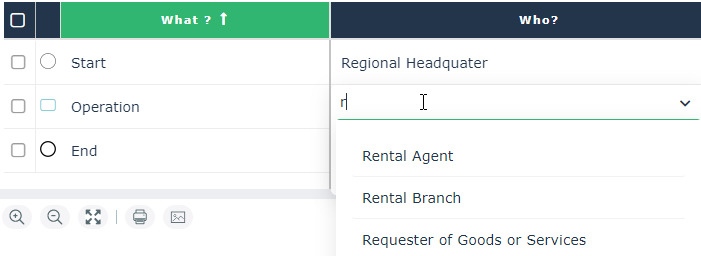 The org-units name that are already connected to a participant are marked with a star “*” in the research list without criteria.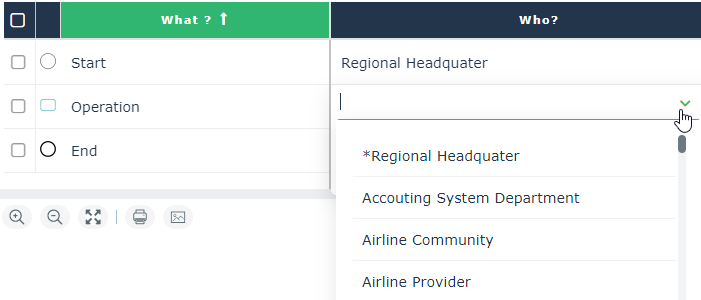
Creating a participant outside a described object
A participant external to a described process only has meaning if it is connected to a flow exchanged with an element included in the described process.
To create a participant outside of an organizational process diagram, for example:
1. Click the Message flow tab to have access to the list of message flows in the diagram.
2. Click New to create a new message flow.
3. Select the line of the message flow that you have just created and click in the check box of the Target column, for example.
4. Click the right facing arrow and select the Create participant.
The external participant appears in the diagram.
No org_unit can be associated to an external participant.