Creating Diagrams
To create a diagram, you must first initialize the diagram from an object, then you can:
• insert objects
• insert shapes
• insert text
 See Managing Texts.
• organize objects and shapes
See Handling Elements.See Handling Lines.Initializing a diagram from the pop-up menu of an object
To create a diagram from the pop-up menu of an object:
1. Right-click the object of interest.
2. Select New > Diagram.
3. Select the diagram type you want to create.
4. Click OK.
The diagram is initialized with the object it describes.
Initializing a diagram from an object in a list/tree
To create a diagram from an object list/tree:
1. Access the object list or the tree containing the object.
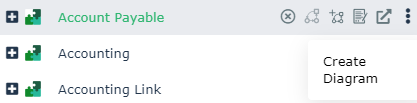
2. Hover the cursor over the Local name of the object you want to describe.
A list of buttons appears.
3. Click Create Diagram  .
.
.
4. Select the diagram type you want to create.
5. Click OK.
The diagram is initialized with the object it describes.