HOPEX Prerequisites
Prequesites
Minimum version
HOPEX for Confluence module can be used from HOPEX Version 5 onwards
HOPEX installation
HOPEX server must be reachable from internet.
Module installation
HOPEX for Confluence module must have been installed from the Confluence Store in the Confluence working space.
API key
An API key must be created to set up the connection between HOPEX and Confluence.
To create an API key:
1. Connect to HOPEX Application Server - Console.
2. Select Modules > Authentication.
3. Select Api keys, then click Create.
• Enter a key Name.
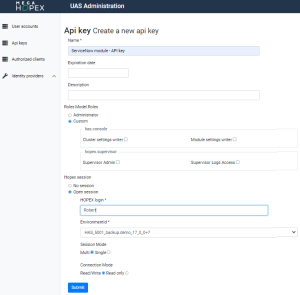
4. Configure the Roles:
• Select Custom
• Leave the fields below blank
5. Configure HOPEX session:
• Select Open session
• Enter a valid HOPEX login
• Select the EnvironmentId
• Select the Repository if applicable
 You need to create one API key per repository.
• Select the Profile if applicable
Bear in mind that the profile you use must have sufficient CRUD rights on the objects that will be synched. 6. Configure Session mode:
• Multi (recommanded)
• Single (slower and requires more memory)
7. Configure Connection Mode field:
• Read/write (useless)
• Read only (recommanded)
8. Click Submit.
9. Copy the key.
 Save the key somewhere, you won't be able to access it again.