Describing an Application Deployment Environment
An application deployment environment is described by an application deployment environment diagram.
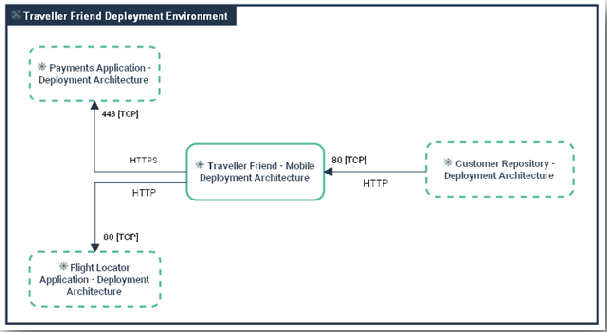
An application deployment environment diagram includes the following elements:
• Subject application deployment architectures and Partner application deployment architectures,
 An application deployment architecture describes one possible deployment configuration of an application. It contains the deployment architectures to be hosted, recommends hosting architectures and identifies required communication techniques (communication protocols and port numbers) they use to communicate with each other. . An application may have several deployment architectures (E.g.: autonomous installation, horizontal or vertical deployment, etc.)
• Partner micro-services,
A micro-service is a software component that can be deployed autonomously, but which does not directly provide an end user service. It can interact with other application services, applications or application systems. This is a deployable software component that uses software technologies. For example: an authentication service, a PDF file printing service.• Technical communication lines.
A technical communication line represents a technical connection between architectures or application technical areas through client and server ports. Client technical port of an architecture or a technical area requires opening the communication line to server technical port of the other area or technical architecture.Creating an Application Deployment Environment
To create an application deployment environment from the Deployment navigation pane:
1. Select Hierarchical View.
2. From the Application Deployment Environment folder, click New > Application Deployment Environment.
3. In the creation dialog box, select the Name of the Subject Application Deployment Architecture and click OK.
The new application deployment environment appears in the list.
Using an application deployment environment diagram
To create an application deployment environment diagram from the Deployment navigation pane:
1. Select Hierarchical View.
2. From the Application Deployment Environment folder, select the application deployment environment that interests you and click Create Diagram button.
3. In the dialog box, select Application Deployment Architecture Diagram and click OK.
The application deployment environment diagram opens in the edit area. The Subject application deployment architecture is placed in the center of the frame.