Describing an Application Deployment Architecture and its diagram
An application deployment architecture allows you to describe the overview elements that must be deployed to implement an application architecture: Deployable Application Packages, Deployable Data Packages as well as Technical Communication Lines used for data exchange.
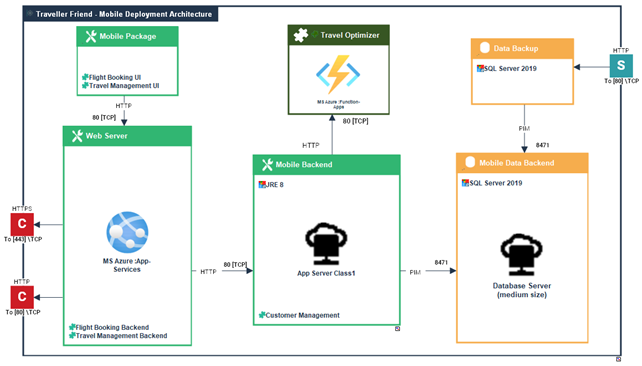
An deployment architecture diagram includes the following elements:
• Deployable Application Packages,
 A deployable application package is a split of application code according to technical criteria for hosting purpose. For example, it may be N tiers, Front End/Back End/… or GUI/Business Logic/Database etc... Each deployable application package is associated to required technologies (for running) and can host code for several IT services. Architect can also prescribes a kind of hosting artefact (IaaS/PaaS cloud service or IT server model).
• Deployable Data Packages,
A deployable data package represents a data part of an application deployment that must be hosted and accessed by application services (code) to run. Each deployable data package is associated to required technologies (for data hosting and access) and can host several data structures. Architect can also prescribes a kind of hosting artefact (IaaS/PaaS cloud service or IT server model). Architect can also prescribes a kind of hosting artefact (IaaS/PaaS cloud service or IT server model). For more details on deployable data packages, see Adding a deployable application package in an application deployment architecture diagram.
• Micro-Services,
A micro-service is a software component that can be deployed autonomously, but which does not directly provide an end user service. It can interact with other application services, applications or application systems. This is a deployable software component that uses software technologies. For example: an authentication service, a PDF file printing service.• Technical Server Port and Technical Client Port,
A server port is a point used to open communications with a technical architecture or an application technical area in compliance with a particular communication protocol (SMTP, HTTP, etc.).A client port is a point used to request the opening of communications from a technical architecture or an application technical area in compliance with a particular communication protocol (SMTP, HTTP, etc.).For more details on technical ports, see Adding technical ports.• Technical communication lines.
A technical communication line represents a technical connection between architectures or application technical areas through client and server ports. Client technical port of an architecture or a technical area requires opening the communication line to server technical port of the other area or technical architecture.You can create a Application Deployment Architecture by creating an Application Deployment Architecture diagram directly from the application that interests you.For more details on technical communications, see Describing technical communications.Creating an Application Deployment Architecture
To create an application deployment architecture from the Deployment navigation pane:
1. Select Application Deployment Architectures.
The list of application deployment architectures appears in the edit area.
2. Click New.
3. In the creation dialog box, select the Owner Application.
4. (Option) Select the Application Deployment Template click Next and select the components to be reused.
For more details on application deployment templates, see Deployment Architecture Templates.5. Click OK.
The diagram opens and Then, you can modify the content of your new application deployment architecture.
You can also create a Application Deployment Architecture by creating an Application Deployment Architecture diagram directly from the application that interests you.