Presentation of exchange contract templates supplied as standard
Exchange contract templates are supplied as standard to simplify the creation of your exchange contracts. These exchange contracts are supported by exchange templates.
Some exchange contract templates are provided with the solution.
The exchange contract template “One way communication”
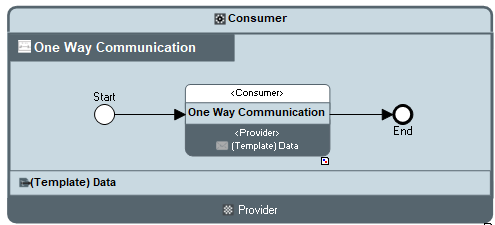
“One way communication” Exchange Contract Diagram (BPMN)
This exchange contract is based on an exchange use noted “One way communication” between the consumer and the provider.
 An exchange use represents the usage of an exchange in another exchange contract.
The exchange use represents the content “(Template) Data” exchanged between the consumer and the provider.
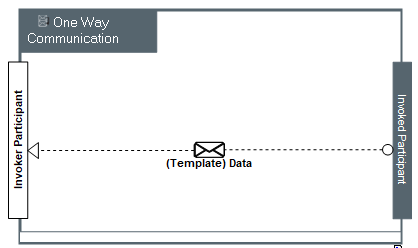
“One way communication” Exchange diagram (BPMN)
The exchange contract template “Request-Response”
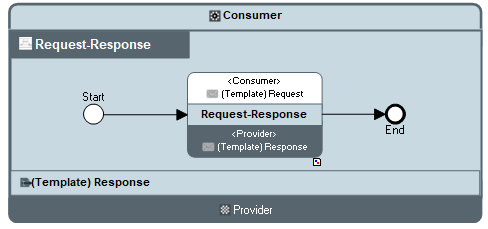
“Request-Response” Exchange Contract Diagram (BPMN)
This exchange contract is based on an exchange use noted “Request-Response” between the consumer and the provider.
An exchange use represents the usage of an exchange in another exchange contract.The exchange use represents the contents “(Template) Request” and “(Template) Response” exchanged between the consumer and the provider.
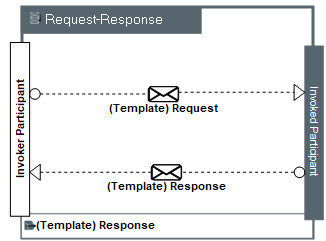
“Request-Response” Exchange Diagram (BPMN)
This exchange represents the sending of a request content and the sending of the response content.
The exchange contract template “Publish-Subscribe”
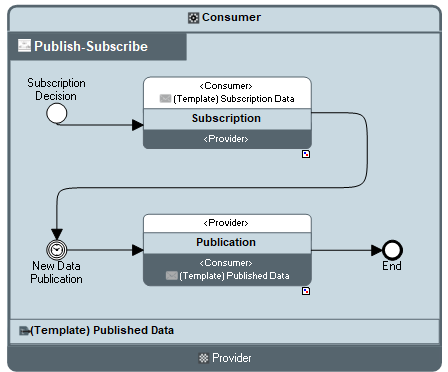
“Publish-Subscribe” Exchange Contract Diagram (BPMN)
This exchange contract is based on exchange uses noted “Publication” and “Subscription” between the consumer and the provider. The request for subscription is sent. An event represents the waiting time before the acceptance for publication.
Accessing the list of exchange contract templates
To access the list of exchange contract templates of a repository:
1. From the Administration navigation pane, select Exchange contract templates.
2. Click on Exchange contract templates tile.
The list of Exchange contract templates appears.
In the same way, to access to the list of exchange templates:
1. From the Administration navigation pane, select Exchange contract templates.
2. Click on Exchange templates tile.
The list of exchange templates appears.
At least, to access the list of content templates:
1. From the Administration navigation pane, select Exchange contract templates.
2. Click on Content templates tile.
The list of content templates appears.