Defining Offerings
Offerings are proposed by enterprise business processes to participants outside the enterprise.
 An offering represents the availability of a product or service supplied by an enterprise through a specific process.
Creating an offering
To create a offering from a Business process diagram:
1. Click the Offering  button.
button. 2. Click the business process and, holding the mouse button down, draw a link to the participant.
3. Release the mouse button.
The link representing the offering appears in the diagram.
Defining offering products
A product represents commodities offered for sale, either goods or merchandise produced as the result of manufacturing, or a service, ie. work done by one person or group that benefits another.To specify the detail of offerings of products:
1. Open the Characteristics property page of the offering that interests you.
2. In the Product section, click the New button and enter the product name.
The name of the product appears in the diagram.
 A product can be broken down into component products from its properties page or from the navigator.
Describing offering implementation
Use the business process diagram of the process that is linked to the offering to describe the organization and exchanges that are associated with it.
In this way, when you initialize a Business process diagram of a process, a flow is automatically created for each offering.
For more details on business process diagrams, see Creating a Business Process Diagram.For more details on flows, see Defining Message Flows.Flows and contents are automatically created.
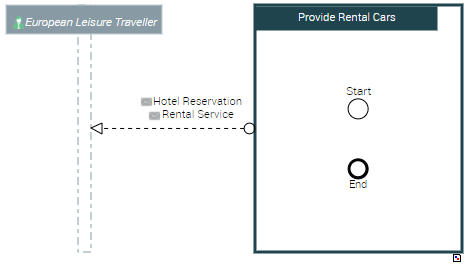
In the example above, a flow is created to describe the Contents that support the car rental and the hotel reservation.