Generating a Work Program Automatically
HOPEX Internal Audit allows automatic creation of work program structure:
• from audit templates (audits with "template" status). See Creating "Template" Audits.
• from past audits.
• from processes connected to the audit
Initializing the work program from a template audit
Initializing the work program from a template audit allows capitalization on work already carried out, therefore saving valuable time.
To create a work program automatically from a template:
1. Open the properties of the audit.
2. Select the Working Program page.
3. Click the icon of the audit and select Initialize Program from Template.
4. In the Parameters frame of the window that appears, select from the drop-down menus:
• an audit plan
• an audit
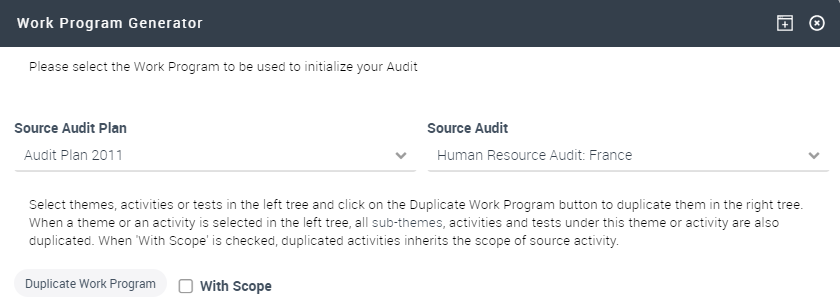
A "template" structure appears in the Source Audit frame.
5. Select the themes, activities or workpapers and click Duplicate to duplicate them in the Target Audit.
6. When the tree has been defined, click OK.
Initializing the work program from a process
An audit work program can be initialized from processes in the scope of the audit. To connect a process to an audit, see Audit scope.
The work program is defined as follows:
• Each process and sub-process connected to the audit produces a theme.
• Each risk connected to the process is processed in an activity.
To create a work program automatically from a process:
1. In the properties of the audit, select the Work Program page.
2. Click the icon of the audit and select Initialize Program from Processes.
A message requests confirmation of work program generation.
3. Click Yes to validate.
 In the case of error or of change, you can reinitialize the work program.
The work program appears.