Defining and Assessing Risks
Risks can be identified at different levels at audit execution. For example, in the framework of an audit on hardware purchase, a risk on requirement suitability may be identified, such as a bad technological choice.
We differentiate:
• risks discovered during the audit
• risks previously defined in the audit and activity scope.
 To define scope:
• of an audit, see Audit scope.
• of an activity, see Specifying risks connected to an audit activity.
Risks discovered during audit execution should be connected to the activity finding, or to the recommendation.
Displaying the list of risks
In the Risks page of audit properties, you can view:
• the risks associated with the audit
• the risks associated to the objects in the audit
To determine with which object a risk is associated:
1. Open the audit properties and select the Risks page.
2. In the upper frame, select a risk in the list.
The lower frame displays the object with which it is associated (for example an audit activity).
Assessing Risks
To assess the objects (in their context):
1. Open the properties of the audit.
2. Select the Risks page.
3. Select the risk(s) you want to assess.
4. Select the value(s) characterizing the risk(s).
• Impact: impact of the risk when it occurs
• Likelihood: probability that the risk will appear
• Control Level
 Control Level: characterizes efficiency level of control elements deployed (controls) to assess the risk.
5. Click Validate Multiple Assessment Table.
Assessment validation enables you to view results in the risk map. Validation can take a while, therefore the wizard offers to execute this process later if needed.The following values are calculated:
• inherent risk
The inherent (or gross) risk indicates the risk to which the organization is exposed in the absence of measures taken to modify the occurrence likelihood or impact of this risk. This is the result of multiplying impact value and probability value before taking account of risk prevention or reduction measures.• residual risk
The residual (or net) risk indicates the risk to which the organization remains exposed after management has processed the risk.Generating the risk map (HeatMap)
A report enables you to view the map of risks associated with an audit, depending on their assessment criteria (Impact, Likelihood, etc.).
To view the risk map associated with an audit:
 In the properties of the audit, select the Reports page then Heatmaps.
The audit risk map appears.
The number of risks displayed depends on the number of contexts.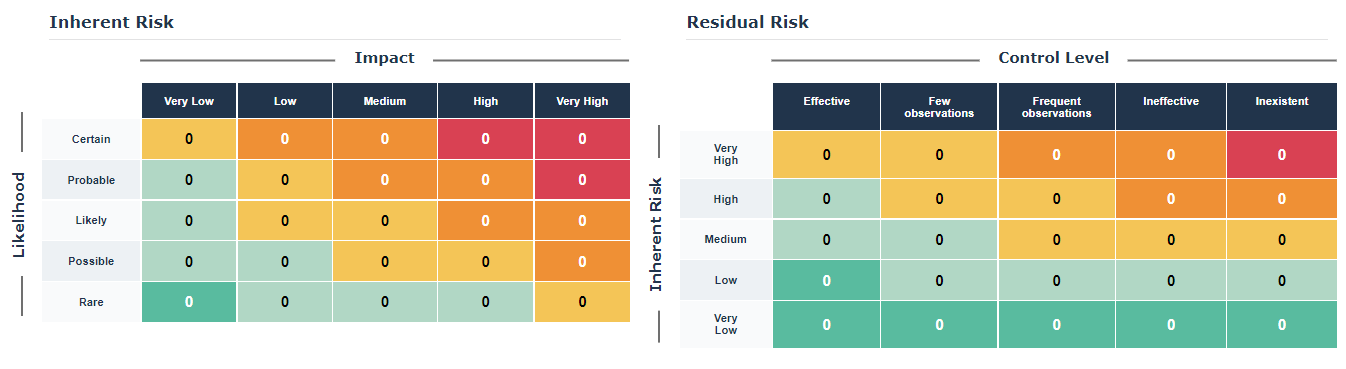 Risks must have first been assessed to be able to get results in this risk map.