Defining Business Capabilities
Presentation
A business capability defines an expected skill.
 .A business capability is a set of features that can be made available by a system (an enterprise or an automated system).
For example, to respond to a customer satisfaction objective, the organization must be able to provide services conforming to contractual commitments.
A capability map describes what the enterprise is capable of producing for its internal needs or for meeting the needs of its clients. It is thus based on the main business capabilities of its activity at a given moment.
A business capability map is a set of business capabilities with their dependencies that, together, define a framework for an enterprise stage.For example, the standard capability to provide pizzas is based on the "Preparation of pizzas" and "Delivery of pizzas" business capabilities.
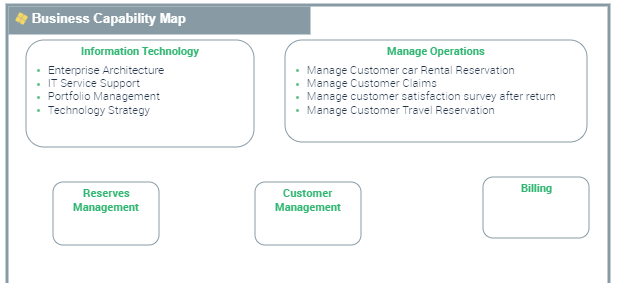
In HOPEX IT Portfolio Management you can generate in the form of a report a business capability map for a portfolio.
The business capability map of a portfolio reflects functional coverage of applications of a given portfolio. It is particularly useful to view the functional coverage change of application assets over time. See Generating the Business Capability Map of a Portfolio.
Capabilities can be previously defined in a global capability map. The existence of a business capability map of the company enables automatic creation of business capability maps subsequently generated at the portfolio level.
Creating a business capability
To create a business capability:
1. Connect to HOPEX IT Portfolio Management as functional administrator.
2. Click the navigation menu, then Environment > All Business Capabilities.
3. In the edit area, click the Business Capabilities tab then New.
The business capability creation wizard opens.
4. Indicate the name of the business capability and possibly its owner.
5. Click OK.
You can also create a Business Capability from an application.
To associate a capability with an application, see Defining Application Functional Scope.
Business capability properties
To view properties of a business capability:
 Click the business capability icon then Properties.
Under the Characteristics page, you can define:
• The Color attribute: the value given to this attribute changes the shape color representing the area, district or block displayed in the diagram.
• The owned capabilities
The Applications page allows you to specify the applications that realize the business capability.
Creating a global business capability map
The administrator can create the global capability map in the Environment navigation pane.
To create a global business capability map:
1. Connect to HOPEX IT Portfolio Managementas functional administrator.
2. Click the navigation menu, then Environment > Business Capabilities.
3. In the edit area, click the All Business Capability Maps tab then New.
The business capability map creation wizard opens.
4. Indicate the name of the business capability map and possibly its owner.
5. Click OK.
Creating the diagram of a business capability map
To create a business capability map diagram:
Click the icon of the business capability map that interests you and select New > Business Capability Map Diagram.The diagram opens in the edit area. The frame of the business capability map described appears in the diagram.
Defining the components of a business capability
A Business capability component is the involvement of a business capability in the context of a business capability map (one and only one) linked to an enterprise.
To add a business capability composition to a business capability map diagram:
1. In the diagram insert toolbar, click Capability Composition.
2. Click in the frame of the business capability map.
The creation window for a capability composition opens.
3. Click on the arrow associated with the Name field and select the business capability that interests you.
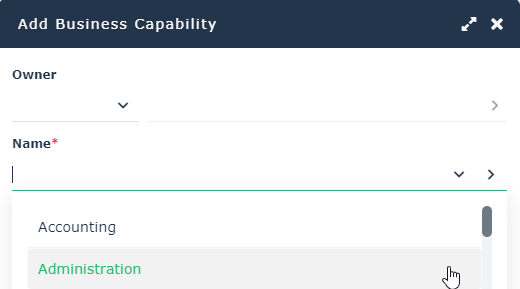
4. Click OK.
The capability composition appears in the diagram.
Defining business capability dependencies
A dependency link between one capability composition and another is used to specify the elements on which this dependency is based.
For example, for "Delivery of pizzas" use "Prepare the pizzas". Note that the expected result (business effect) of "Delivery of pizzas" is a "Pizza delivered" and the expected result (business effect) of "Preparation of pizzas" is a "Cooked pizza".
Dependent Business Effect and Desired Business Effect are the business capability results.
To create dependency links between two capability compositions:
1. In the insert toolbar of the diagram, click Business Capability Dependency.
2. Click the user component, and keeping the left mouse button pressed, move the cursor to the assembly used.
3. Release the mouse button.
The capability composition appears in the diagram.
To enter the results concerned by a dependency between two business capability components:
1. Open the Characteristics properties dialog box.
2. Enter the user component result in the Dependent Business Effect field.
For example, "Pizza delivered".
3. Enter the user assembly result in the Desired Business Effect field.
For example, "Pizza cooked".
Generating a Business Capability Treemap on an Application Portfolio
A business capability treemap breaks down a capacity tree according to three possible criteria:
• Number of components: the surface area is proportional to the number of sub-capabilities in the tree.
• Number of applications: the surface area is proportional to the number of applications realizing current and descendant capabilities in the tree.
• Cost of applications: the surface area is proportional to the cost of applications realizing current and descendant capabilities in the tree.
Note that:
• Since an application can realize several capabilities, the "Cost Contribution Key" ratio is applied for the criteria "Number of applications" and "Cost of Application".
• As a result of the application of this distribution coefficient, the number of applications may not be an integer (it represents an application coverage ratio).
• An application realizing an "intermediate" capability (i.e. not a leaf of the tree) is considered to realize all its sub-capabilities in a uniform way (strict pro rata between all sub-capabilities).
To generate a Business Capability Treemap from an application portfolio:
1. Open the properties of the portfolio in question.
2. Click the drop-down list then Reporting > Business Capabilities Tree Map.
3. Select a capability map.
4. Refresh the report.
For more details on business capability treemaps, see Handling a Treemap.