The TOGAF 9 Dictionaries
Three dictionaries are provided with the HOPEX Suite for TOGAF framework to ensure that the user can benefit from a shared and agreed-on vocabulary. The definitions of these dictionaries come from the TOGAF 9 framework.
To access the elements of the TOGAF 9 dictionaries:
1. In the TOGAF 9 navigation window expand the Dictionaries folder.
Three folders corresponding to the different dictionary components appear.
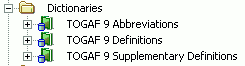
2. Expand any of the three dictionary components folder, for example, TOGAF 9 Definitions, to view the list of terms (or abbreviations) provided.
• The TOGAF 9 Abbreviations folder contains the abbreviations of terms contained in the dictionaries. The term corresponding to the abbreviation is displayed in the Properties dialog box of the abbreviation, Characteristics tab.
• The TOGAF 9 Definitions and TOGAF 9 Supplementary Definitions folders contain terms and definitions that can be attached to elements of the architecture. The definition text of terms is located in the Properties dialog box of the term, Characteristics tab
 For more details on how to use the dictionary, see the HOPEX Common Features user guide, "Using the Dictionary" paragraph.