Discovering the Representation of the ADM Method
HOPEX integrates the TOGAF Architecture Development Method (ADM) in order to describe the sequence of projects (of organization, architecture, integration or application development).
HOPEX allows you to equip your approach through the definition of methods, phases, and deliverables. As such, with HOPEX Suite for TOGAF, a project can be initialized as the implementation of the ADM method. The sub-projects are linked to the method phases.
In this context, HOPEX Suite for TOGAF allows you to easily initiate a project by providing indications at each stage of its progression.
A phase scheduling diagram describes the sequence of the different phases of a method.
Accessing diagrams
To access the diagram that describes a method:
1. In the TOGAF 9 navigation window, expand the ADM Methods folder.
2. Right-click the desired method, for example, TOGAF 9 ADM and in its pop-up menu select Phase Scheduling Diagram.
The phase scheduling diagram appears.
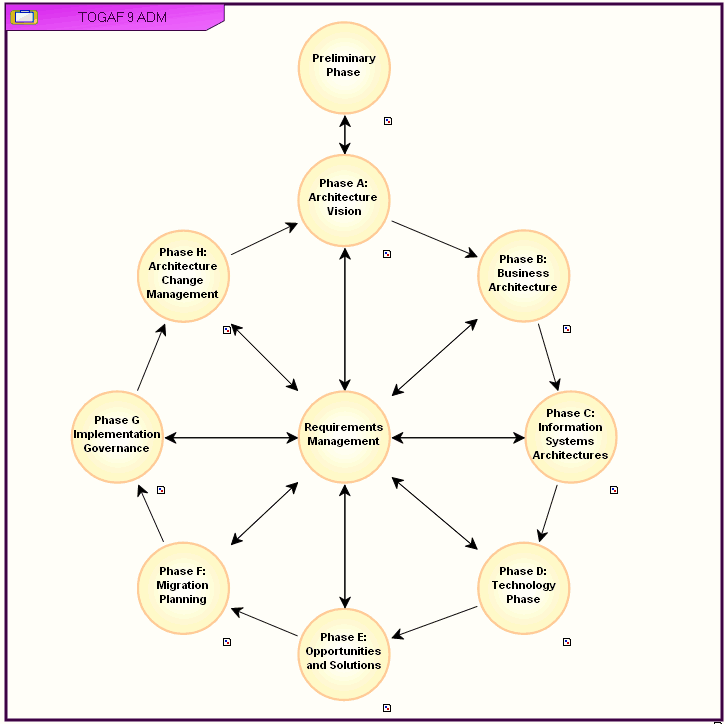
"TOGAF 9 ADM" Method Phase Scheduling Diagram
It presents the sequencing order of phases and the deliverables expected at input and output of each of these phases.
To access the diagram that describes a method linked to a phase:
 Double-click a phase, for example, Preliminary Phase.
The phase scheduling diagram of the phase appears.
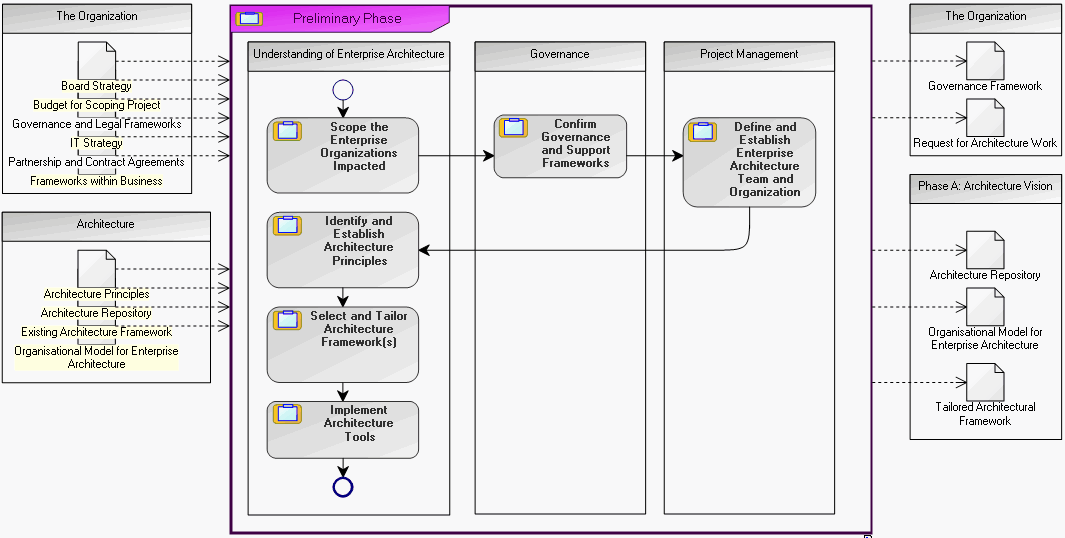
 A phase scheduling diagram can be represented in standard notation or in BPMN notation, depending on the Method Graphical Notation defined in the Characteristics tab of a method.