Accessing the TOGAF Metamodel
To access the TOGAF 9 Metamodel diagram:
1. Check that you have "Advanced" access rights to the metamodel (Tools > Options, Repository > Metamodel Access > Advanced).
2. In the MetaStudio navigation window, expand the MetaModel.
3. Expand the MEGA Modeling and TOGAF 9 Metamodel folders.
4. Right-click Full Metamodel and in the pop-up menu select MetaModel Diagram.
5. Select Full MetaModel::TOGAF 9 Full Metamodel and click OK.
The metamodel diagram opens. It describes the metamodel instances.
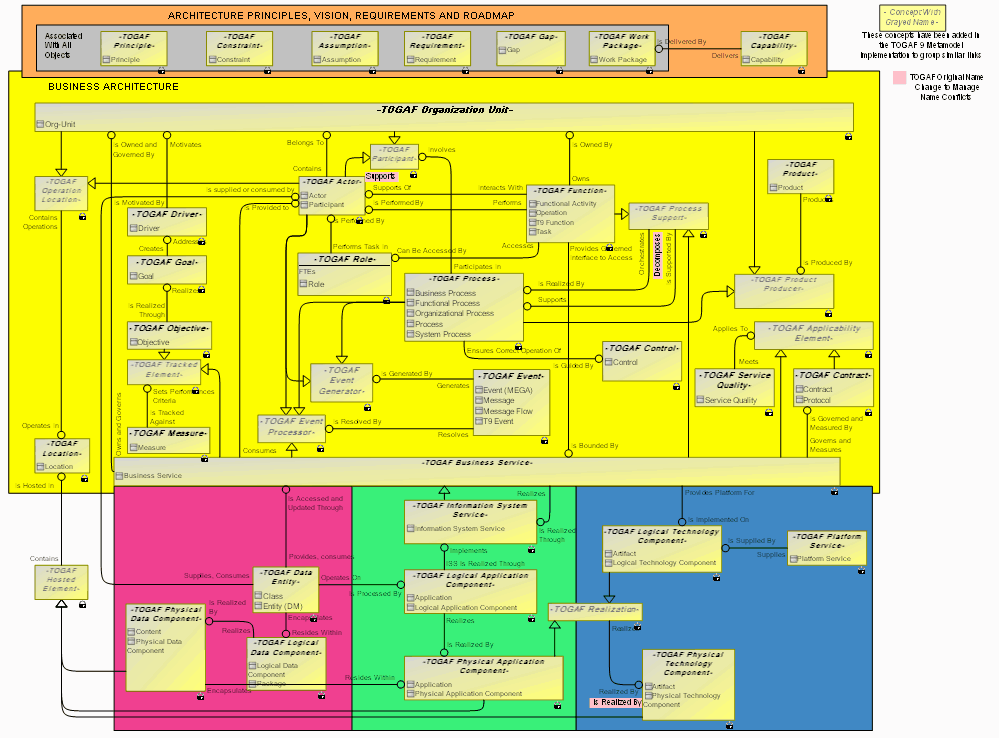
Full Metamodel Diagram for TOGAF 9
Graphical descriptions of other metamodels exist with details of the complete implementation of the TOGAF 9 metamodel in the HOPEX repository.