Accessing the Process Events
The Processes navigation pane gives access to all the supervised processes.
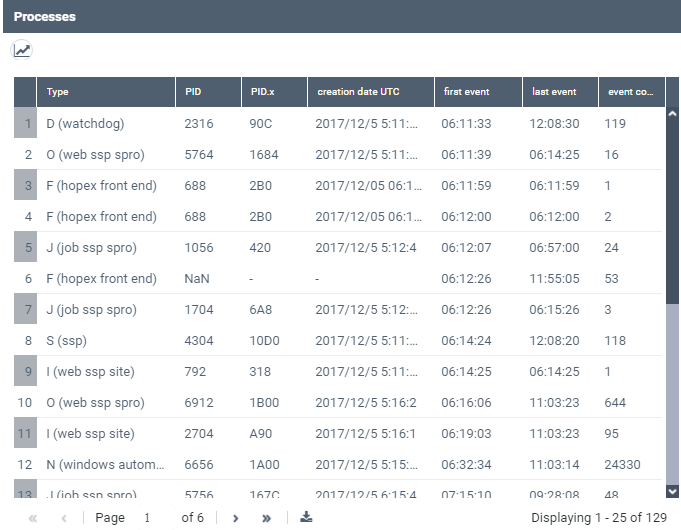
For each process it details:
• its Type
• its identifier PID (decimal format), PIDx (hexadecimal format)
• its Creation date (time in UTC format)
• its first event time and last event time (both in local time)
 By default a snapshot is taken every 3 minutes, so that the first and last event time interval represents the process life time (more or less 3 minutes)
• its number of events (event count)
To access the process events:
1. Access the HOPEX Supervision console.
2. In the HOPEX Supervision console navigation panes, click Processes.
The Processes view is displayed.
3. Click:
• the process row you are interested in to get detailed information regarding all its events.
• Graph the number of supervised Hopex process  to display the graph of the supervised process number as a function of time.
to display the graph of the supervised process number as a function of time. This graph enables to see the number and type of concurrent processes.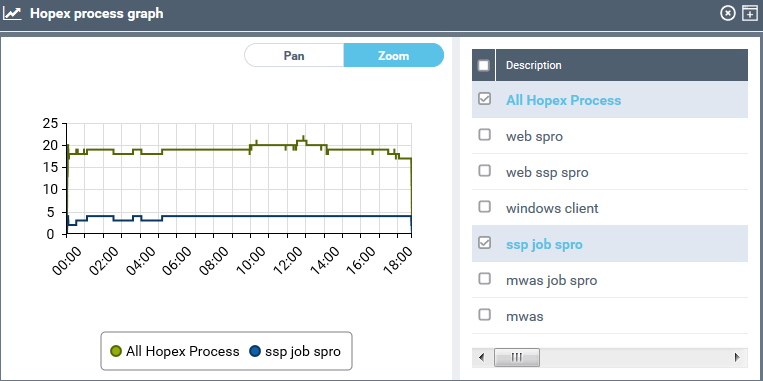
In the Description pane, select the descriptors you want to be displayed in the graph, so as to see how many processes, and of which types, are loaded simultaneously.