Configuring Windows Authentication
Synchronization with a company directory
Active Directory is a directory service designed principally for Windows environments.
Active Directory is a directory referencing persons (name, first name, phone number, etc) and objects such as servers, printers, applications, databases, etc.
Active Directory enables inventory of all information concerning the network (users, machines and applications). Active Directory is at the heart of all network architecture and its purpose is to enable users to find and access any resource identified by the service.
Active Directory is based on standards DNS, LDAP, Kerberos, etc.
Associating a Windows user with a HOPEX user manually
You can connect a single HOPEX user to a Windows user.
To indicate the Windows identifier of a HOPEX user in the Administration application:
1. Open the properties dialog box of the user login.

2. Select the Characteristics tab.
3. In the Authentication Mode field drop-down list, select "Windows".
The Windows Login field appears.
4. In the Windows Login drop-down list  , select Select Windows User.
, select Select Windows User.The Select User dialog box opens.
5. In the Enter the object name to select frame, enter the user name.
 To find users with the help of a wizard, click Advanced.
6. Click Check Names.
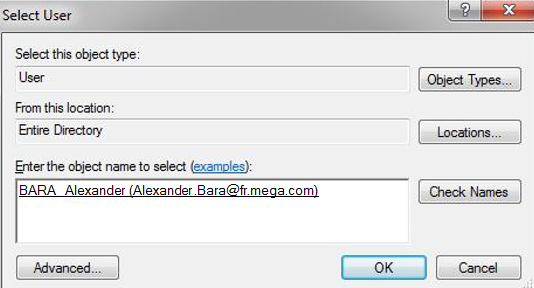
7. Click OK.
The Windows identifier of the user is displayed.
Connection in case of unique authentication
(Windows Front-End) If the HOPEX user is:
• different from that identified by the Windows session opened on the workstation, the user must enter his/her own Windows password.
• the same as that identified by Windows session opened on the workstation, the user does not need to enter his/her password.
(Web Front-End) The user must enter his/her Windows password.
Single sign-on precautions
A system repository in which all users have been changed to Single Sign On connection mode (Windows) can no longer be opened outside the company in which the repository was created.
If you want the repository to be opened outside your company (by the HOPEX technical support team for example), ensure that at least one user remains in MEGA authentication mode.