Connecting to HOPEX
When you connect to HOPEX, you can:
• create a private workspace (if you do not already have one).
 You can only have one private workspace open in the same environment.The private workspace is open for each user on both his/her repository and on the system repository. A private workspace always exists on system repository even if the user is not using any of the system repository objects.
• resume work in your private workspace
• resume work in a collaborative workspace
To connect to HOPEX:
1. Start the HOPEX application.
The authentication dialog box appears.
2. In the Login field, enter your login.
3. (Optional) In the Password box, enter your password if required.
4. In the Environment field, select your work environment.
5. Click OK.
You are authenticated, your name appears in the Person field.
6. In the Repository field, select your work repository.
If you already have a private workspace open, the repository is automatically selected and this field is grayed. To change repository, you must first dispatch or discard your current private workspace.7. In the Profile field, select the profile with which you want to work.
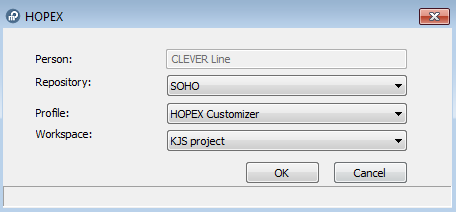
8. If:
• you do not have a collaborative workspace available, the Workspace field is not available. Click OK.
A private workspace is created and your desktop opens.
If you already have a private workspace open, you should connect to it. If you want to change profile or repository, you must close the private workspace that is open.• you have at least one collaborative workspace available, in the Workspace field, select Access Private Workspace or select the collaborative workspace to which you want to connect, or select Create Private Workspace (if one has not already been created). Click OK.
A user has at most one private workspace in progress in an environment, but can have in parallel several available collaborative workspaces.Your desktop opens.
A private workspace comprises a set of files located in a sub-folder of the repository:
"<EnvironmentName>\DB\<RepositoryName>\<RepositoryName>.Transactions\xyz.*"
where "xyz" represents the user code.
Note that a private workspace cannot be separated from its repository (these files cannot be used independently).