Accessing HOPEX Administration
The Administration application is the HOPEX administration application accessible from the Windows desktop.
To access the HOPEX Administration application (Windows Front-End):
 Double-click the "Administration.exe" file
  .
.The HOPEX Administration main window opens.
 Environments preceded by a red icon are not accessible.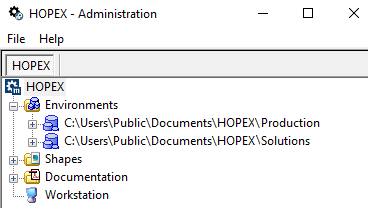
HOPEX Administration is presented in the form of a navigation tree:
• containing the elements you can manage:
• site
• enabling access to:
• the list of shapes used in HOPEX
• technical characteristics of the HOPEX installation on your workstation.