Product Overview
HOPEX for SAP Solution Manager 7.2 is a solution that enables information sharing between HOPEX Business Process Analysis and SAP Solution Manager 7.2. It implements a use case in which each side owns its own data and pushes it to the other side, thus keeping information aligned and up-to-date:
• HOPEX is the owner of all business process hierarchy, description, and diagrams.
• SAP Solution Manager is the only place where the technical description of these objects, mainly transaction association, is performed.
• In SAP Solution Manager , users can see the process hierarchy and images of process diagrams. In HOPEX users see which SAP transactions are used to execute processes and operations in SAP.
The full use case is described by the following chart:
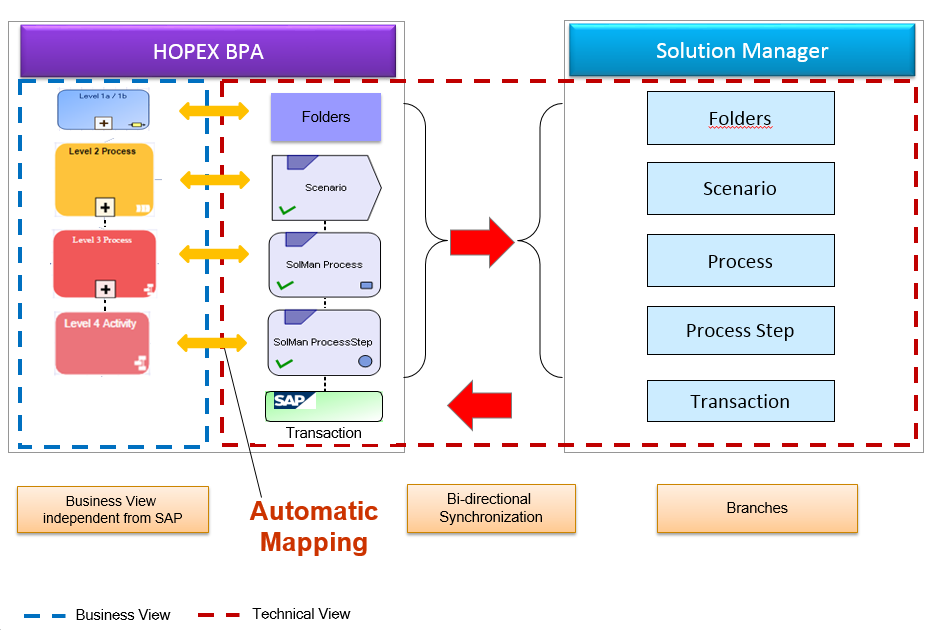
1. In HOPEX, users describe the entire business process hierarchy. They can use all the artifacts available in HOPEX BPA: Business Processes, Value Streams (former Functional Processes), Organizational Processes and Activities. All these objects (except activities) may be associated with diagrams describing them using BPMN notation.
2. Next, mapping is performed to generate an image of the SolMan process hierarchy in HOPEX. This automatic mapping is a key point in implementation and must be adapted to your process level organization. HOPEX enables a flexible description of process hierarchy, with four different object types and each level can be nested (business process within business process, or org-process within org-process, for example). On the other side, SolMan has a rigid structure, with three object types (process step, process, scenario) that can be grouped into folders. We describe below how this mapping can be configured to fit your process methodology. You should note that for correct mapping behavior, process organization in HOPEX must be standardized, with a number of levels and use of object types that are consistent for all business areas described.
3. This structure then can be pushed in SolMan, in a dedicated HOPEX area, so that SAP users can see this hierarchy. All diagrams describing the processes are sent into SolMan and can be viewed as attachments (images).
4. In SolMan, SAP users can then map technical objects, mainly transactions to this hierarchy. This describes which SAP standard or custom transactions will cover every step, process or scenario.
5. This transaction allocation can then be retrieved in HOPEX, and users can see, on each business object, the SAP transactions that will be used to execute these processes.
6. Additional reports may help HOPEX users to see:
• Transactions used in a business process branch.
• Transaction list with associated business objects.
• SolMan hierarchy mapped to business objects.