Navigation Tree Structure
To access the structure of a navigation tree:
1. In the HOPEX workspace, select View > Navigation Windows > MetaStudio.
The majority of existing navigation trees are grouped in folders accessible from the MetaViewport folder. Trees not attached to any context are in the MetaTree folder.
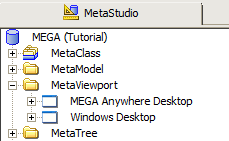
 To access these folders, you must have opened the MetaStudio navigation window with Expert metamodel access.
 2. Expand the MetaViewport folder.
A list of the different contexts in which existing navigation trees can be used appears.
MetaViewport is a MetaClass. It is installed and filtered at extraction of products. 3. Expand the Windows Desktop folder.
The list of existing navigation trees in your HOPEX workspace appears.
4. Expand for example the Projects tree, then the (Projects) Root node.
The main branches of the Projects navigation window appear:
• "(Projects) Root - My Projects Fold"
• "(Projects) Root - Projects Fold"