Managing Assessed Characteristics
 An assessed characteristic defines what the assessment seeks to assess. It can be associated with a MetaClass, and more specifically with one of its MetaAttributes, for example: Risk MetaClass, MetaAttribute: Criticality.
An assessed characteristic relates to a characteristic of an object type.
You can for example create a "Risk Impact" assessed characteristic relating to the Risk MetaClass and the Impact MetaAttribute.
Creating an assessed characteristic
To create an assessed characteristic:
1. See Accessing Assesment Templates.
2. In the properties page of an assessment template, select the Assessment Template Definition > Assessed Characteristics tab.
3. Click the New button.
4. In the creation dialog box, indicate the Name of the characteristic you want to create.
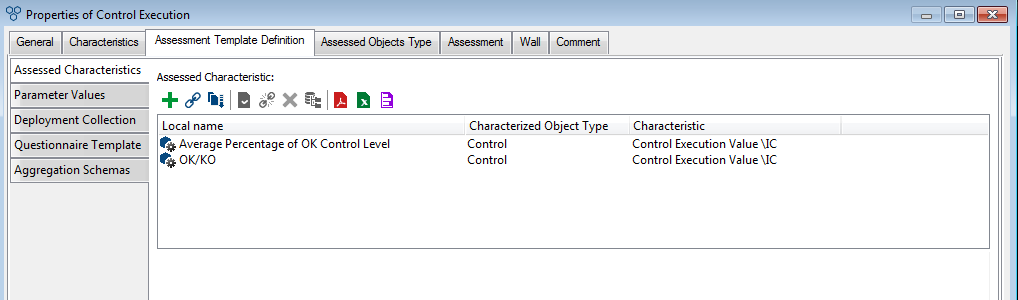
5. In the properties of the assessed characteristic, indicate the Owner of the characteristic (ie. a library).
 An assessed characteristic can be used by several assessment templates; it is important to classify these in libraries to find them easily. For more details on the use of libraries, see the HOPEX Common Features guide.
Specifying the object type and the corresponding MetaAttribute
To specify the object type and the MetaAttribute concerned by the assessed characteristic:
1. In the properties page of the assessed characteristics, in the Characterized Object Type field, specify the MetaClass to which the characteristic relates.
For more information on proposed MetaClasses, see Specifying Assessed Object Type.2. In the Characteristic field, specify the MetaAttribute representing the assessed characteristic.
An assessed characteristic can be common to several assessment templates or sessions.Updating the MetaClass MetaAttribute
When the assessment session window is closed, the quotation rules are applied to calculate the value of the assessed characteristic.
HOPEX is used to update the MetaAttribute of the assessed object and to define how to perform this update at the time of deployment or aggregation (if there are more than one context objects).
To define how to update the MetaAttribute:
 In the properties page of the assessed characteristic, in the Update MetaAttribute field, specify if you want to:
• copy the value of the assessed characteristic.
This option is valid if only one person answers the questions, for example, within the context of a direct assessment: a single characteristic value is obtained and copied in the attribute concerned.• calculate the average of the assessed characteristic values
This option is valid if more than one person answers the questions: a number of assessed characteristics are obtained for the MetaAttribute concerned.• apply a specific macro: if you select this option, select the Update MetaAttribute by Macro field to specify the macro that you want to use.
An assessed characteristic can be used in several assessment templates. The macro is the same irrespective of the assessment template used.If you want to implement a specific macro, the function must include the following parameters:
• Assessment session
• Assessment node
• Assessed object
• Value of the assessed characteristic.
• Metaattribute
Specifying the display mode as a list
You can specify, in the object lists that display the characteristics of an assessed object in columns, whether the assessed characteristic must be:
• displayed
• masked
• read-only
To do this:
In the properties page of an assessed characteristic, in the List View Display Mode field, select the associated value.