Managing Teams
Before planning tests, appropriate teams must be set up and roles and responsibilities assigned.
You must previously define:
• skill types
• skills list
• skill levels
Tools are available that enable definition and display of the skills of team members.
Creating Controllers
To create a controller, you must create a person and associate the "Control Tester" profile.
 For more information on creation of users and assignment of profiles, see the chapter "Managing Users" in the HOPEX Power Supervisor guide.
Creating skill types
To create a skill type:
1. In the HOPEX IRM desktop, select Administration > Skill Management > All Skill Types.
2. Click New.
3. Enter a Name for the skill type, for example "Languages".
4. Click OK.
Creating skills
To create a skill:
1. In the HOPEX IRM desktop, select Administration > Skill Management > All Skills.
2. Click New.
3. Enter a Name for the skill, for example "English".
4. Click OK.
The new skill is added to the list of skills.
In properties of the skill you can indicate the Skill Type to which it is attached, for example "Languages".
Creating skill levels
You must now create skill levels to be associated with each skill type.
To create a skill level:
1. In the HOPEX IRM desktop, select Administration > Skill Management > All Skill Types.
2. Open the properties of the skill type that interests you.
3. In the Skill Levels section, click New.
4. Enter a Name, for example "Beginner".
5. Click OK.
6. In Skill Level Value, enter a figure corresponding to the skill level, for example "1" for "Beginner" (while "4" could correspond with "Experienced" in our example).
This figure gives a graphic view of the extent of controller skills in the test assignment page. Defining skills for each user
To define the skills of a user:
1. In the Administration navigation pane, select Skill Management > View Users With Skills.
2. Select a user and click the Person Properties button.
3. In the properties, select the Skills page.
You can specify user skills as a function of previously defined skill types and skill levels.
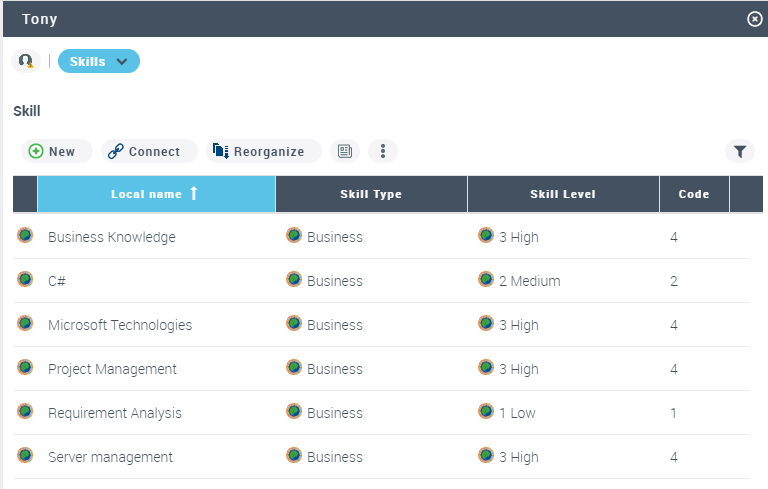
Example of skills
Viewing skills
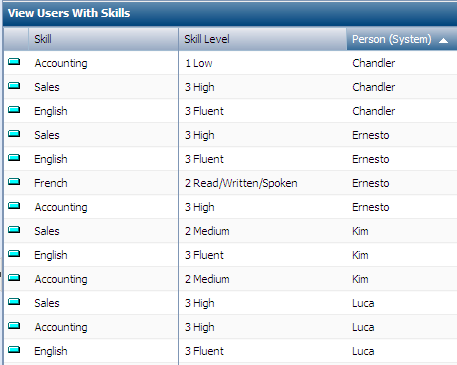
To view the skills and skill levels available within the team:
1. In the HOPEX IRM desktop, select Administration > Skill Management > Manage Skills with Users.
A list appears. You can sort the list by skill, skill level and user by clicking the header of the corresponding column.