Running Reverse Engineering
To run reverse engineering:
1. Right-click the database and select Reverse target database.
The Reverse a target database dialog box opens.
2. Select the Type of data source: Extraction file obtained using the data extraction utility (see ODBC Extraction Utility).
3. Indicate the location of the file.
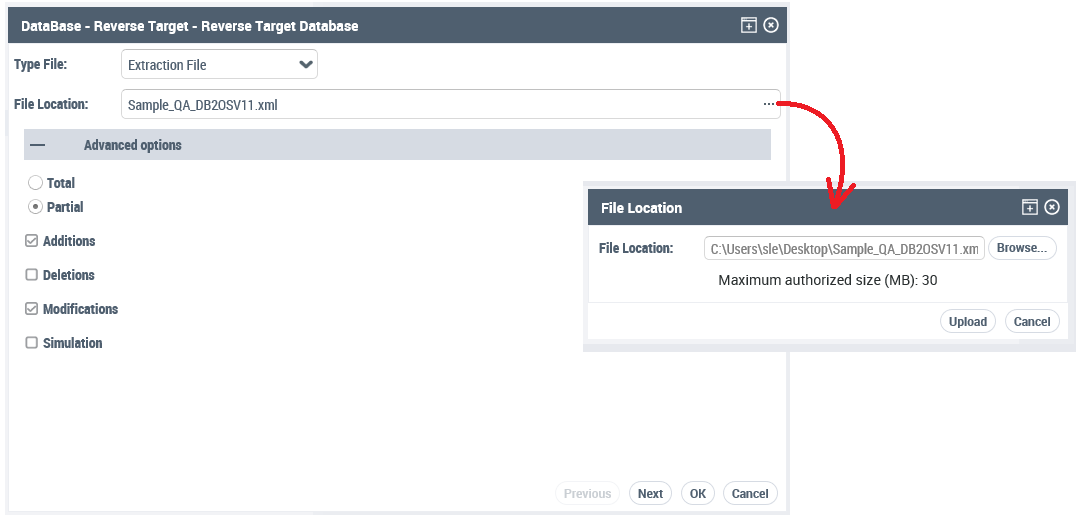
4. Define the Options:
If the database has already been reverse engineered, it is possible to specify the extent of the Reinitialization, which can be:
• Total: all existing tables are deleted.
• Partial concerns only Additions, Deletions or Modifications.
The Simulation option is provided so you can simulate the operation and generate a report indicating the impact on the repository.
5. Click the Next button to run reverse engineering.
Messages inform you of progress.
6. On completion of processing, a report displays the details of the execution.
At the end of reverse engineering, the database tables and columns are created. However, the relational diagram must be created in order to view the database in a graphical model.
 If non-standard datatypes were created in the DBMS, they must be added to the configuration if they are to be recognized by HOPEX..