Describing an Application Environment with HOPEX IT Architecture V2
 An application environment is used to represent a use context of an application. An application environment allows presenting the other application systems, applications, micro-services or actors with which this application can interact.
Accessing the List of Application Environments
To access the list of application environments from the Application Architecture navigation pane:
 Select Functional Architecture > Application Environments.
The list of application environments appears in the edit area.
Creating an application environment
To create an Application environment::
1. From the Application Architecture navigation pane, select Functional Architecture > Application Environments.
The list of application environments appears in the edit area.
2. Click New.
The new application environment appears in the list.
Application environment properties
The Characteristics properties page of an application environment provides access to:
• its Owner, by default during creation of an application system environment, the current library.
• its Name,
• the text of its Description.
 For more details on other property pages of the application environment, see HOPEX IT Architecture V2 properties pages content.
With HOPEX IT Architecture V2, an application environment is entirely described by a an application environment diagram that is used to describe the interactions between the environment applications described, its users and the external applications.
An application environment presents the use context of the applications of a project. This describes the interactions between the org-units involved and the internal and external applications of the projects that ensure the project functionalities.The following diagram describes the application environment corresponding to the processing of spare parts purchasing.
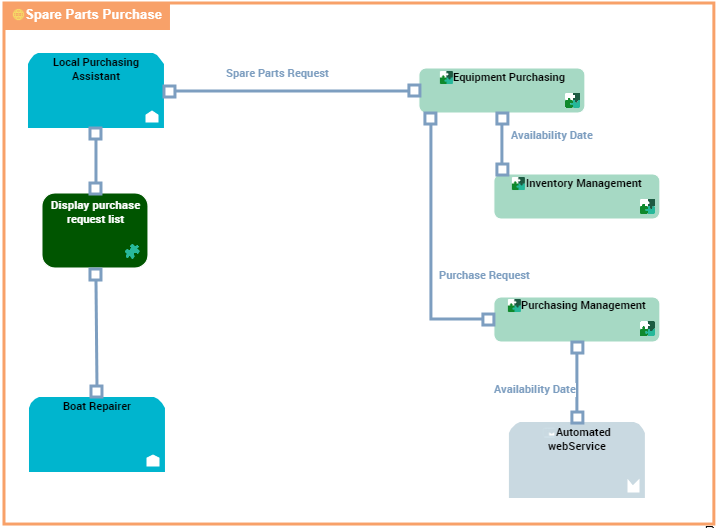
"Spare Parts Purchase" application environment diagram
The requests for spare parts are formulated by the persons concerned with boat repairs and these requests are processed by the local purchasing assistants.
Consultation of parts in stock is carried out by the local on-site purchasing assistant. Following consultation, the assistant can make an availability request.
Two order types are possible, one for parts already referenced, the other for parts as yet unreferenced. In both cases, a request for availability is put forth.
Order follow-up is assured by the local purchasing assistant and the boat repairer.
An application environment diagram includes:
• applications that represent the environment described.
In the example, this concerns the applications used for buying spare parts.
An application is a software component that can be deployed and provides users with a set of functionalities.• applications, application services or partner micro-services that represent the external elements used in the described environment.
This example concerns automated Web services.
An IT service is a component of an application made available to the end user of the application in the context of his/her work.• org-units or type positions that represent the users or the suppliers of the environment described.
This example concerns local participants.
An org-unit represents a person or a group of persons that intervenes in the enterprise business processes or information system. An org-unit can be internal or external to the enterprise. An internal org-unit is an organizational element of enterprise structure such as a management, department, or job function. It is defined at a level depending on the degree of detail to be provided on the organization (see org-unit type). Example: financial management, sales management, marketing department, account manager. An external org-unit is an external entity that exchanges flows with the enterprise. Example: customer, supplier, government office.• interactions between components.
An interaction represents a contract established in a specific context between autonomous entities that are internal or external to an enterprise. These entities can be enterprise org-units, applications, activities or processes, as well as external org-units. The content of this contract is described by an exchange contract.• access, request and service points
Creating an application environment use case diagram
For more details on use case diagrams, see Use Case Diagram.To access these functions, you must be connected with UML Designer.To create a use case diagram from an application environment:
1. Right-click the application environment and click New > Diagram.
2. Creating a Application environment use case diagram.
The diagram opens in the edit window.