Attaching an Event to a Process
To attach an event to a process:
1. Click the event and hold the mouse button down.
2. Position the event on the border of the process.
To detach the event from the process border:
 Right-click the event and select Detach.
Compensation description
Compensation is caused by an event occurring during process execution. This event is placed at the edge of the interrupted process. It can be moved along the edge of the process.
To free the event from the process, use the Detach command in its pop-up menu.
This event can trigger a compensation operation.
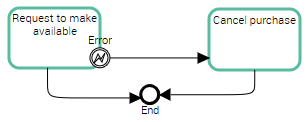
 For reasons of consistency and simplification, the compensation link is represented in HOPEX by a sequence flow. BPMN standard proposes a specific link.