ArchiMate® import Overview
ArchiMate® design can be serialized into an xml file that supports the standard objects and diagrams. The HOPEX for the ArchiMate® Framework import aims at importing ArchiMate® Models from files so that architectures modeled in other ArchiMate® modeling tools can be reused by HOPEX.
Pre-Requisites
The ArchiMate import feature is available with HOPEX for the ArchiMate® Framework and supports ArchiMate® 3.0/3.0.1 models.
Necessary solution packs should have been imported.
 For more details about solution pack, see "Pre-Requisites to HOPEX for the ArchiMate® Framework", page 6.
The root target container (enterprise or library) should be selected when triggering the import.
Scope of ArchiMate® Import
The import covers the requirements of the ArchiMate® Exchange format:
• ArchiMate Elements,
• Relationships,
• Views and diagrams,
• Folders,
• Properties.
For more details on the list of supported mappings, see Imported objects mapping.
Importing an ArchiMate File
To import an ArchiMate Model file in HOPEX for the ArchiMate® Framework:
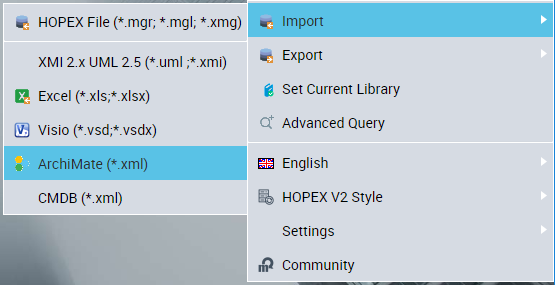
1. From Main Menu, select Import > ArchiMate (*.xml).
2. In the Import File of the ArchiMate Import - Parameterization dialog box, specify the path of the file to be imported.
3. (Optional) In the Option section, select a Target Container.
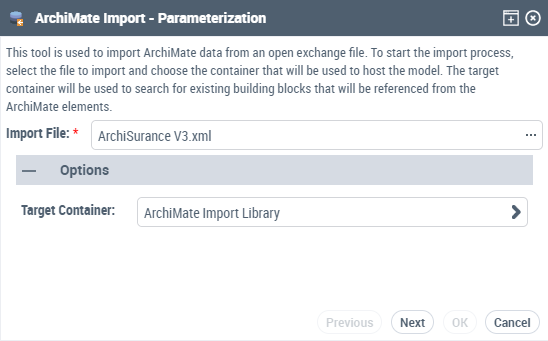
4. Click Next.
The file is uploaded, and a summary is edited.
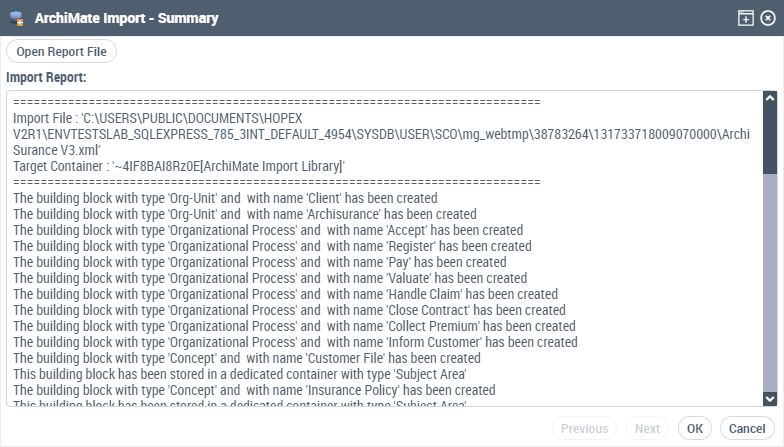
An import report file is displayed.
5. Click Close.
The ArchiMate model, views, elements, relationships, properties and views' diagrams are created in the HOPEX for the ArchiMate® Framework repository