Accessing your IT architectures with HOPEX Digital Transformation Desktop
To access the elements that are part of your IT architectures:
1. Click the navigation menu, then Application Architecture.
2. In the navigation pane, click Hierarchy.
A tree with the different architecture levels is displayed.
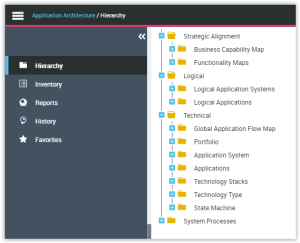
• The Strategic Alignment folder enables the definition of Business capability maps and Functionality Maps in order to prepare for the transformation of your enterprise.
• The Logical folder provides access to the list of elements of your logical architecture.
 See Modeling Business Capabilities and the logical application architecture in the HOPEX IT Architecture guide.
• The Technical folder provides access to the list of elements of the technical architecture.