Accessing the Session Events
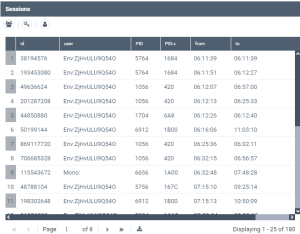
The Sessions navigation pane gives access to the list of all the sessions of all the users.
For each session it details:
• the session identifier (id)
• the session user name, with the following format:
• for persons:
<session connection mode>:<person name>
with <session connection mode>: "mono" (users do not share processes) or "multi" (users share the same processesi)
• for the spro of the ssp:
env:<environment identifier>
• the process identifier PID (decimal format), PIDx (hexadecimal format)
• the first (from) and last (to) supervision event time regarding the user session.
If several logs have been loaded, the date is also indicated.
• the number of events (event count)
To access the session events:
1. Access the HOPEX Supervision console.

2. In the HOPEX Supervision console navigation panes, click Sessions.
The Sessions view is displayed.
3. Click:
• the session row you are interested in to get detailed information regarding all its events.
• graph the number of sessions  to get the graph of the session number as a function of time. In the Description pane, you can select the type of sessions (mono or multi sessions, or those open from the ssp) you want to display.
to get the graph of the session number as a function of time. In the Description pane, you can select the type of sessions (mono or multi sessions, or those open from the ssp) you want to display.  This graph enables to see the number of concurrent sessions.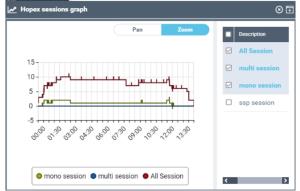
• graph licence token  to get the graph of the tokens used by product license, for all the sessions, as a function of time. In the Description pane, you can select the product licenses you want to display.
to get the graph of the tokens used by product license, for all the sessions, as a function of time. In the Description pane, you can select the product licenses you want to display.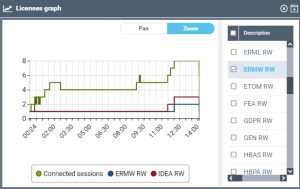
• graph profiles  to get the graph of connected pofiles as a fonction of time. In the Description pane, you can select the profiles you want to display.
to get the graph of connected pofiles as a fonction of time. In the Description pane, you can select the profiles you want to display.