Importing a Solution Pack in HOPEX
A Solution Pack includes data and/or system data.
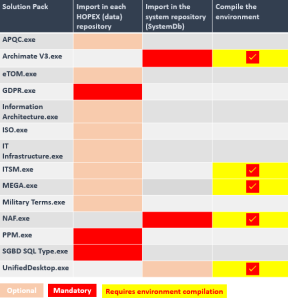
Depending on the Solution Pack, the import must be done:
• on each HOPEX (data) repository of the environment.
• on the SystemDb repository of the environment.
Prerequisite: the Solution Pack that you want to import is unzip (HOPEX installation folder > Utilities > Solution Pack, double-click the Solution Pack to extract it).
To import a Solution Pack in a repository:
1. From HOPEX Administration, connect to the environment concerned.

2. Expand the Repositories folder.
3. Right-click the repository concerned and select Object Management > Import Solution Pack.
The Solution Pack Import dialog box appears.
4. Select the Solution Pack(s) that you want to import.
5. Click OK.
The Import MEGA Data XML dialog box displays import progress.
The selected Solution Packs are imported into the repository.
6. (If needed, see previous table) Repeat the steps for each HOPEX repository.
7. (If needed, see previous table) Compile the environment.