Displaying Scheduled Jobs
Depending on your profile (eg: HOPEX Customizer, functional Administrator), in your HOPEX desktop, you have access to the dashboard for scheduled Triggers (of jobs):
• Triggers created by MEGA
• you triggers
To display the dashboard for scheduled Triggers:
1. In your HOPEX desktop, click Main Menu  .
.
.2. Select Scheduling Management > Scheduling.
The dashboard for scheduled Triggers is displayed.
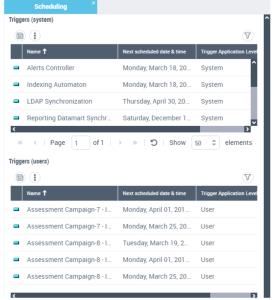
The dashboard specifies the following for each Trigger:
• the date and time of its next execution
• its status (enabled or disabled)