Connecting a Line to a Drawing Object
You can connect the end of a line to an object, so that if the object moves, the line moves with it.
To attach a line to an element:
1. Select the handle at the end of the line.
2. Holding the mouse button down, drag the handle inside the drawing object.
3. Release the mouse button.
4. Right-click the handle and in the pop-up menu that appears, select Connect to object.
The pointer takes shape  and the handle is attached to the element: when the element is moved, the handle follows.
and the handle is attached to the element: when the element is moved, the handle follows.You can also double-click on the handle to connect or disconnect the line.
The linked extremity can then be moved outside the element: when the element moves, the end of the line moves, maintaining its position related to the element.
In the example below, the two arrows are connected to the ellipse and follow its movements:
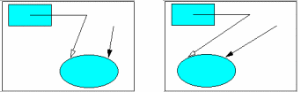
When an end is connected to a drawing object, the pointer shape changes to when you point to the handle.
when you point to the handle.To disconnect a line from a drawing object:
1. Position the pointer over the connected end of the line.
2. In the pop-up menu, select Disconnect.