Activating the Views and Details window
The Views and Details window details presents a list of views (object types to be displayed) which varies according to diagram type.
To activate the views window:
1. In a diagram, click Views and Details  .
.
.The list of views (object types to be displayed) appears.
2. Select or clear the views you wish to display or not.
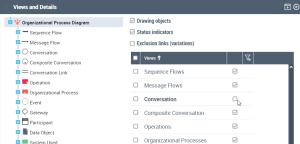
 The Drawing Objects check box allows you to show or hide purely graphical elements representing neither object nor link.
3. Click OK.
The window closes.
The display and the insert toolbar of the diagram are updated according to the configuration specified.