Running an Excel Export
You can run an export from the Excel file configuration window.
To run an export:
2. Click Next.
3. Click Open the Excel file to view the export file.
The file opens in an Excel table. You can save it if you wish.
4. To modify export parameters, click Previous.
5. To discard export, click Cancel.
6. Click OK to finish.
The generated Excel file is in the format expected for later import.
Example of generated files
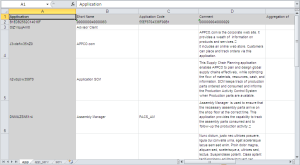
Below is an application worksheet presenting:
• In column A: the list of applications, by absolute identifier.
• Column B: the list of applications, by short name.
• In the columns that follow: attributes of applications (short name, code, comment, etc.).
In each column, the grayed first two lines indicate the datatype of the column and its absolute identifier.