Home Page
For a general description of an Explorer desktop, see "Description of the HOPEX Explorer Desktop", page 7.
The home page HOPEX Explorer provides tiles that you can use to perform the most common tasks on the objects that you work with.
 The tiles and menus displayed depend on the solution(s) used.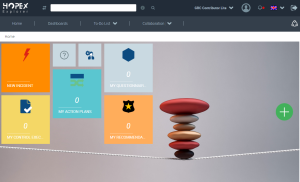
You can, for example, answer questionnaires or enter a progress percentage for your action plans.
Use the navigation tabs to access:
• your Dashboard
You can add widgets adapted to various GRC issues.
• your To-Do List
For more details, see "Liste de tâches", page 3.• the Collaboration functionalities common to all products HOPEX.
For more details, see "Accessing a Collaboration Feature".