Assessing a customer journey
When the questions have been defined, the customer journey can be assessed.
Access the customer journeys for the assessments
Access to the customer journey is different depending on what you want to do:
To access the list of customer journeys that have never been assessed:
 Select Assessment > Non Assessed Customer Journeys.
To consult the results of the assessment consolidation of a customer journey:
Select Assessment > All Assessed Customer Journeys. For more details on calculating assessment values, see Consolidation rules
To assess a customer journey that has already been assessed:
Select Customer Journeys > All Customer Journeys.Answering questions for the assessment of a customer journey
To assess a customer journey for the first time:
1. Open the Customer journey navigation window.
2. Select Assessment > Customer Journey Non Assessed.
The list of non-assessed customer journeys is displayed.
To access a customer journey that has already been assessed, select Customer Journeys > All Customer Journeys.3. Select the customer journey that interests you and click Assess.
The properties dialog box for the window appears.
4. Answer the question and click OK.
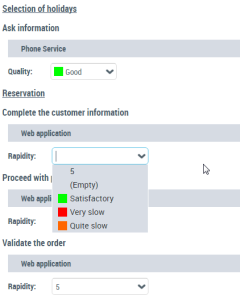 To assess a customer journey that has already been assessed: open the Customer journey navigation pane, select Assessment > All Assessed Customer Journeys and click Assess.