Launching a Report Illustrating Contextualizations
From a business process, you can launch a report in the form of a matrix to illustrate contextualizations.
To launch a report illustrating contextualizations:
1. Right-click the business process concerned and select Report Discovery.
2. In the list of available reports, expand the "Process Analysis" folder.
3. From the "Business Process Contextualization Matrix (BPMN)" report, click Launch a new report.
4. In the report page, click the name of the report chapter.
A matrix appears.
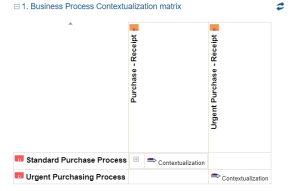
This matrix presents:
• the value streams of the business process in columns
• the organizational processes of the business process in rows
To view a specific context (org-unit, site or product):
 Click the + in the cell.